Learn Center
EZRA (AI Research Analyst)
EZRA is EZPZ's AI research analyst: ask about any ticker or the market in plain words and get a written answer with charts and tables built on EZPZ data.
Your trading research analyst, powered by EZPZ data
Ask EZRA anything about markets, options flow, stocks, or trading strategies in plain words. It pulls the answer together from across EZPZ and writes it up with charts and tables, so you spend your time deciding, not hunting for data.
What is EZRA, the EZPZ AI research analyst?
EZRA is the AI research analyst built into EZPZ Trading. You ask a trading or market question in plain words, and EZRA reads EZPZ's own options flow, dark pool, gamma, regime score, and fundamentals data to write the answer, complete with charts and tables. It is research support, not a trade signal.
Most trading questions need several pages to answer. "Is SPY bullish today?" means checking the options tape, the dark pool levels, dealer gamma, the intraday regime, and the news. EZRA does that legwork for you. It works out which data the question needs, pulls it, and leads with a clear bias and the reason behind it, then backs it with the numbers. Because it remembers the whole chat, a follow up such as "and what about QQQ?" or "build me a put spread for that" can be one line. EZRA reads the same data that powers pages like Live Flow, Dark Pool Flow, and Gamma Exposure, so every answer can point you to the page where you can check it. Four EZPZ pages make up the EZRA experience, and this guide covers all of them: the EZRA chat, the EZPZ AI Research Analyst quick start page, EZRA Responses, and EZRA Tours.
Who can use EZRA and how much
The full EZRA chat is an Elite feature. Everything around it is open to everyone, including visitors who have not signed up, so you can see exactly what EZRA does before you pay for it.
| What you get | Visitors and Free, Pro, Premium | Elite |
|---|---|---|
| Read EZRA Responses and shared answers | Yes | Yes |
| Watch EZRA Tours | Yes | Yes |
| Quick start demo | 5 questions per 24 hours, delayed data | Not needed, use the full chat |
| Full EZRA chat on live EZPZ data | No, opens the pricing page | Yes |
| Questions | 5 in any 24 hours | 20 per chat, no daily cap on new chats |
| Day, Swing and Invest modes | Through the demo prompt cards | Yes, switch any time |
| Chat History and Search chats | No, demo chats are not saved | Yes, your 30 most recent chats |
| Attach images, PDFs and data files | No | Yes, up to 5 files per message |
| Create share links | No | Yes, for one answer or a whole chat |
How the counts work:
- Elite, 20 per chat. The 0/20 counter in the header and the 0 / 20 queries used line under the message box count questions in the current chat. Click New Chat and the count starts again at zero. There is no daily or monthly quota on chats.
- Demo, 5 per 24 hours. Each quick start card you run uses 1 of 5 free questions. The window starts with your first question and the 5 come back 24 hours later. Clearing cookies does not reset it.
- Signed out. Opening the EZRA chat asks you to log in first. Signed in without Elite, it takes you to the pricing page.
The EZRA workspace
The chat page is titled EZPZ AI · Research Analyst (EZRA). It opens on a welcome screen with the suggestion cards for your mode, your Chat History on the left, and the message box at the bottom.
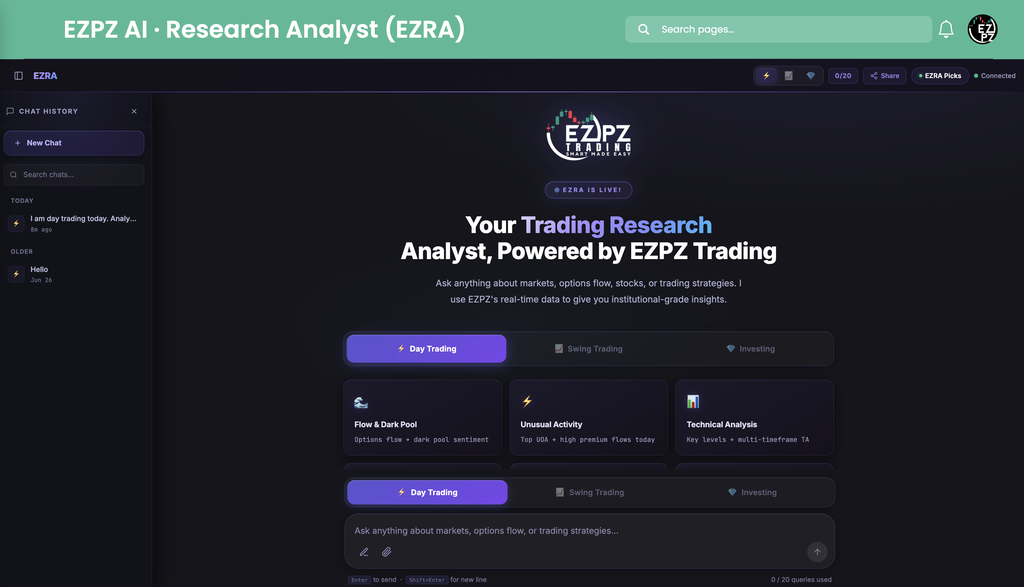
| Area | What it does |
|---|---|
| ⚡ 📈 💎 | Header mode buttons: Intraday Day Trading, Swing Trading, and Investing. The one lit up is the mode your next question uses. |
| 0/20 | Questions used in this chat out of 20. |
| Share | Shares the whole conversation as a public link. |
| EZRA Picks | Opens EZRA Responses, the hand picked answer gallery. It is not a list of stock picks. |
| Connected | Live connection status. It reads Connecting while it starts, and if it shows Disconnected it reconnects on its own after a few seconds. |
| CHAT HISTORY | Your saved chats, grouped under Today and Older. New Chat starts a clean chat and Search chats filters them. The sidebar icon in the header hides or shows it. |
| Welcome screen | The EZRA is live badge, the Day Trading, Swing Trading, and Investing tabs, nine suggestion cards for the chosen mode, and a link to curator selected EZRA responses. |
| Message box | Type your question. Enter sends, Shift+Enter adds a new line. The pencil icon starts a new chat and the paperclip attaches files. The mode tabs repeat above the box, shortened to Day, Swing, and Invest on a phone. |
Paste a long block of text, such as a news article or your trade plan, and EZRA folds it into a card above the box so the box stays tidy. Click Show in text field to edit it, or add a short note and send both together.
Day Trading, Swing Trading and Investing modes
The mode tells EZRA which horizon you trade and which EZPZ score to lead with. The same question gets a different answer in each mode: "Is NVDA a buy?" means today's session in Day Trading, the next one to three weeks in Swing Trading, and years in Investing. Every answer and every EZRA Response carries its mode badge. Pick a tab to see what changes and the nine suggestion cards for that mode.
The default mode. EZRA reads the ticker's EZPZ intraday regime first and lets it anchor the bias, then layers on live options flow, dark pool prints, gamma levels, and the session's movers. See Intraday Regime Leaderboard for the score itself. If a ticker has no intraday score, EZRA says so and reads SPY for market context.
| Card | What it asks for |
|---|---|
| 🌊 Flow & Dark Pool | Options flow + dark pool sentiment |
| ⚡ Unusual Activity | Top UOA + high premium flows today |
| 📊 Technical Analysis | Key levels + multi-timeframe TA |
| 🎮 GEX & Dealers | Gamma exposure + dealer positioning |
| 🎯 Trade Ideas Now | Actionable setups from flow + TA |
| 🌅 Pre-Market Setup | Levels, bias + movers today |
| 🔍 Live Scanner | Unusual volume + dark pool scan |
| 🧮 Greeks & IV Rank | IV rank, VRP + Greeks analysis |
| 📐 Risk & Sizing | Position size + stop placement |
For trades held one to three weeks. EZRA leads with the EZPZ swing score and reads it as a percent bullish or bearish, then adds daily and weekly technicals, multi day institutional flow, and dealer positioning one to two weeks out. See Swing Regime Leaderboard for the score.
| Card | What it asks for |
|---|---|
| 📋 Full Swing Analysis | Daily/weekly TA + targets |
| 💡 Swing Ideas | Best 1-3 week setups this week |
| 🏦 Institutional Flow | Multi-day institutional positioning |
| 📌 Swing Watchlist | Flow + dark pool + momentum scan |
| 📈 Daily/Weekly TA | MAs, patterns + key levels |
| 🎮 GEX for Swings | Dealer positioning 1-2 weeks out |
| 🗂️ Comprehensive Plan | Technicals + flow + risk-reward |
| 💥 Breakout Scan | Bullish flow + dark pool + breakouts |
| 🌐 Weekly Outlook | Sector rotation + macro factors |
For long term positions. EZRA leads with the EZPZ Investing Score on its 0 to 100 scale and its zone (Elite 80+, Watchlist, Neutral, or Avoid), the Entry read (READY, WAIT, or PASS), and the Size label, then adds fundamentals, valuation, and institutional accumulation. See Investing Regime Leaderboard for the score.
| Card | What it asks for |
|---|---|
| 🔬 Full Analysis | Fundamentals + valuation + monthly TA |
| 💡 Best Long-Term Buys | Pros, cons, risks + fair value |
| 🐋 Smart Money Signals | Institutional accumulation via flow |
| 📌 LT Watchlist | Fundamentals + flow + macro |
| 📊 Fundamentals Deep Dive | Earnings, revenue + moat analysis |
| 🌐 Macro Outlook | Inflation, rates + sector impact |
| 💰 Valuation Analysis | P/E, PEG, DCF + peer comparison |
| 🏢 Sector Outlook | Top sectors + picks by flow |
| 💸 Dividend & Income | Yield + institutional accumulation |
A card is only a starting prompt. Click it, and the full question lands in the chat, where you can change the ticker or add detail before you ask the next one.
What you can ask EZRA
EZRA can draw on any of these in a single answer. You do not need to know which EZPZ page holds the data; name the ticker and the question.
Options flow and unusual activity
Sweeps, blocks, the biggest premium prints, and net premium for a ticker or the whole market. Like Live Flow and Unusual Activity.
Dark pool prints and levels
Off exchange block trades and the price zones where they cluster. Like Dark Pool Flow.
Gamma and dealer positioning
GEX and DEX by strike, call and put walls, and where dealers may dampen or speed up a move. Like Gamma Exposure and GEX and DEX.
0DTE and short dated flow
Same day, weekly, and 7 DTE activity, plus the intraday put/call ratio. Like 0DTE Flow and Put/Call Ratio.
Option chain, Greeks and IV
Live chain data, Greeks, implied volatility and IV rank, open interest, expected move, and max pain. Like Option Chain and Max Pain.
Options strategy builder
Ask for a spread, a condor, or a covered call and get the legs, max profit and loss, breakevens, probability of profit, capital needed, and a payoff chart. Like Custom Strategies.
Options income scan
Scans for the best premium selling candidates across tickers. Like Theta Farming.
EZPZ scores and leaderboards
The intraday and swing regime scores and the Investing Score for one ticker, or the leaderboards ranked across tickers.
Movers and scanners
Top gainers, gappers, and pre market movers, with flow and dark pool confirmation. Like Top Gainers and Losers and Gap Up and Down.
News and sentiment
Market and macro headlines, company news and press releases, and news sentiment. Like Market News and Company News.
Fundamentals and valuation
Earnings, revenue, margins, P/E and PEG, peer comparison, and the VIX backdrop. Like Basic Financials.
Your own files
Attach a chart screenshot, a PDF report, a CSV of trades, or a Pine Script, and ask EZRA to read it alongside EZPZ data.
When a question is too vague to answer well, for example "what should I buy?", EZRA asks one short clarifying question instead of guessing. Answer it in the same chat.
What an EZRA answer looks like
The written answer streams in first, so you can start reading straight away. Charts and tables arrive at the end of the answer.
- Written analysis. The bias and the reason come first, then the supporting numbers, the key levels, and the risks.
- Charts. Line, bar, candlestick, heatmap, scatter, dual axis, pie, and multi panel charts, plus a payoff diagram for multi leg option strategies. Hover a chart to read exact values.
- Tables. Levels, flow prints, strategy legs, or ranked tickers, marked with an EZPZTrading.com watermark.
- Actions. Under every answer: Copy copies the text, Share opens the Share response dialog for X, WhatsApp, LinkedIn, Telegram, and Facebook, and Copy Link copies a public link to that one answer.
Anyone can open a shared link, even without an account. It shows the question, ticker chips, the full answer with its charts and tables, and a button to open EZRA or try it free.
Attach charts, PDFs and data files
Elite members can hand EZRA their own material. Click the paperclip, drag files anywhere onto the page (you will see Drop files to attach), or paste a screenshot straight into the message box. Press Backspace in an empty box to remove the last file.
| File type | Accepted formats | Limit |
|---|---|---|
| Images | PNG, JPEG, WebP, GIF | Large images are resized for you before upload |
| 4.5 MB and up to 100 pages | ||
| Text and data | .txt, .csv, .tsv, .json, .md, .markdown, .pine, .log | 1 MB, UTF-8 text |
You can send up to 5 files with one message and upload up to 50 files a day. Good uses: a TradingView screenshot you want a second read on, an earnings PDF, or an export of your trades to review.
The EZPZ AI Research Analyst quick start page
The quick start page at /ezpz-ai/ezra/introduce/ is where most people meet EZRA. It is free and needs no account. Its top bar reads EZRA · Live, "See what EZRA actually says, powered by live EZPZ institutional data". Elite members see Open EZRA; everyone else sees Try EZRA Free with "5 free · no card".

| Card | Mode | What EZRA answers |
|---|---|---|
| Top Options Flow | Day | Biggest unusual options plays ranked by total premium |
| Swing Regime | Swing | EZPZ top swing setups ranked by score and conviction |
| SPY Dark Pool Levels | Day | Institutional block trade levels and key price zones for SPY |
| Short Ideas | Day | Bearish flow and weak technicals, high conviction short setups |
| Pre-Market Movers | Day | Top early movers with dark pool and options flow confirmation |
| INTC Investment Case | Invest | Long term EZPZ score, fundamentals, and institutional flow |
Click Ask EZRA on a card and the demo opens and runs that question on delayed data. The counter shows how many of your 5 free questions are left. The demo is built around these prompt cards: questions you type yourself there get a short guided reply, not a full analysis. When all 5 are used, a Preview Complete screen offers Get Elite Access, Browse Responses, and Guided Tours.
Below the cards, "See the full depth of EZRA's analysis" shows the four newest EZRA Responses, each with an Ask this prompt link that runs the same question in the demo, and a link to view them all.
EZRA Responses: real answers, hand picked
EZRA Responses at /ezpz-ai/ezra/responses/ is a gallery of real EZRA answers chosen by the EZPZ team to show what a strong answer looks like. It is free to read. The top bar reads EZRA · Real Responses, "Curator-selected answers powered by live EZPZ institutional data", with Back to the quick start page and Open EZRA or Try EZRA Free. The EZRA Picks button in the chat header opens the same gallery.

| On each card | What it tells you |
|---|---|
| CONVERSATION DAY SWING INVEST | Conversation means a whole multi message chat. Day, Swing, and Invest mark a single answer and the mode it was written in. |
| Question and time | The member's question as they typed it, and how long ago it was asked. |
| LIVE DATA | A preview of EZRA's answer, written from live EZPZ data at the time it was asked. |
| Ticker chips | Up to four tickers the answer covers. |
| Read Full Analysis | Opens the complete answer with its charts and tables. On a Conversation card it reads Read Full Conversation and shows every message. |
| Date and messages | The date asked and, for a conversation, how many messages it holds. |
The header shows how many curated picks there are (7 in the capture above), and the gallery pages through them 12 at a time with Previous and Next. The questions are real and often casual, typos included, which shows you do not need perfect wording. Numbers in a response reflect the market when it was asked, so read them as an example of the analysis, not as today's levels.
EZRA Tours: step by step replays
EZRA Tours at /ezpz-ai/tour/ turns a real EZRA analysis into a guided replay you can step through at your own pace. Tours are free to watch. The gallery, titled EZRA · Tours, "Step-by-step walkthroughs of EZRA's live market analysis", lists every tour with its step count and a Watch Tour button. Each tour page carries the tour's name followed by EZRA Tour, for example the EZPZ Options Tour.
- Pick a tourEach card shows the tour name, a short description, and how many steps it has.
- Follow the Steps listThe side list marks each step as ▲ Chart, ▦ Table, or ≡ Narrative, and the header shows your place, such as 1 / 5.
- Move through itUse Prev and Next at the bottom, or the ← and → keys. Narrative steps type themselves out, and charts load when you reach them.
- Finish or leaveOn the last step Next becomes Finish. Press Esc or click Tours to go back to the gallery.
Watch a tour before your first Elite chat. It shows the order EZRA works in, from bias to data to levels, which makes it easier to ask sharp follow ups.
How to write prompts that get great answers
- Pick the right mode firstA Day Trading answer about NVDA is about today's session. Switch to Investing if you mean years.
- Name the ticker and the timeframe"SPY gamma levels for today's close" beats "what is the market doing".
- Say what you want backAsk for a bias, levels, a ranked list, a strategy with breakevens, or a comparison of two tickers.
- Follow up in the same chatEZRA remembers the whole chat, so "now show the put side" or "same for QQQ" is enough. Start a New Chat for an unrelated topic, since chats do not share memory.
- Check before you actOpen the EZPZ page EZRA refers to and confirm any time sensitive price or print there.
Troubleshooting EZRA
I was sent to the pricing page
The EZRA chat needs Elite. Your plan is shown on the pricing page. You can still use the free demo, EZRA Responses, and Tours.
Session limit reached (20/20 queries)
This chat has used its 20 questions and the message box locks. Click + New Chat to keep going. The old chat stays in Chat History.
The status says Disconnected
EZRA reconnects on its own after a few seconds. If it stays that way, reload the page.
Preview Complete in the demo
You have used your 5 free questions. They come back 24 hours after your first one, or get Elite for the full chat.
A file will not attach
Check the type and size against the table above: PDFs up to 4.5 MB, text files up to 1 MB, and no more than 5 files per message.
EZRA asked me a question back
Your request needed one more detail, such as a ticker or a timeframe. Answer it in the same chat and EZRA finishes the analysis.
How EZRA differs from AiPe and the AI TradingView Connector
AiPe is the assistant built into individual EZPZ pages. It sees the page you are on and explains what is on that screen. EZRA is the standalone analyst: it pulls data from across EZPZ into one answer, and it will send you to the right page, or to AiPe on that page, when you want to dig in. The AI TradingView Connector is the EZPZ Finn desktop app that brings EZPZ data and AI next to your TradingView charts. Use EZRA for research questions, AiPe for "what am I looking at?", and the connector when you live in TradingView.