How to read the Gap Up Scanner: gap %, RTH change and dark pool ratio
In the latest data, AXGN gapped up +21.32% and kept running to +30.81% total, while VRT gapped +15.37% with a 26.9% DarkVol ratio. Here is how to read every column of the Gap Up Scanner.

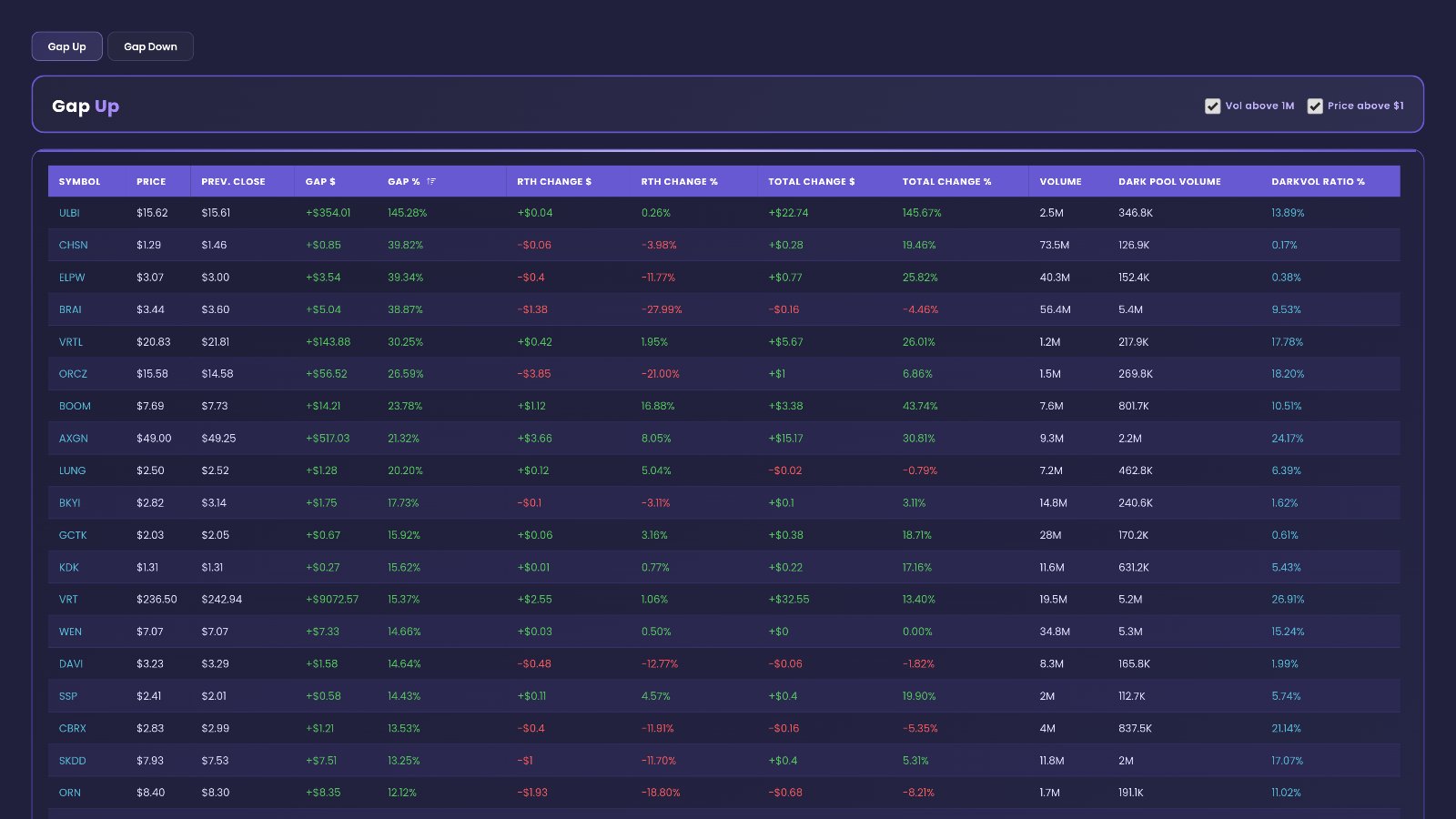
In the latest data on the Gap Up Scanner, AXGN opened with a +21.32% gap and pushed further in regular hours, reaching +30.81% total. VRT gapped +15.37% on 19.5M shares, with a 26.9% DarkVol ratio. KORU gapped +11.38% on 44.5M shares. The scanner puts all of this in one row per stock, so you can see in seconds which gaps are holding and which are fading.
You can follow along on the live Gap Up Scanner, or open the free delayed Gap Up page if you do not have an account yet.
Quick definition first. A gap up is when a stock opens above where it closed the day before. The previous close is the baseline. The gap is the jump from that close to the open. RTH means regular trading hours, the normal market hours after the open. Total change is the full move from the previous close, gap included. Dark pool volume is the shares traded away from the public exchanges, and the DarkVol ratio is that dark volume shown as a share of all volume.
+21.32%
26.9%
44.5M
Why gaps matter, and what this scanner helps you see
A gap is the market's first vote on overnight news. It shows that buyers were willing to pay more before the bell than they paid at the last close. For a swing trader, a gap is often the first sign of a change of direction in a name.
But the gap is only the opening story. What happens next is the real test. The scanner lines up the gap, the move after the open and the volume behind it, side by side.
Gap and go versus gap and fade
Two stocks can show the same gap and tell opposite stories. Compare the gap column with the RTH change column:
- Gap and go: the gap is positive and RTH change is positive too. Buyers kept paying up after the open. AXGN, with +21.32% gap and +8.05% RTH change, reads this way.
- Gap holding: RTH change is close to flat. The gap stuck, but no one pushed further. VRT, with +15.37% gap and +1.06% RTH change, is close to this.
- Gap fade: RTH change is negative. Sellers took back part of the opening jump. In the screenshot, one row gapped 38.87% and then showed -27.99% RTH change.
Volume tells you how much the gap means
A big gap on thin volume is a weak reading. Few shares changed hands, so a few orders could have moved it. The same gap on heavy volume shows wide participation. That is why the Volume column sits next to the price moves.
Dark pool share hints at who is trading
The DarkVol ratio shows how much of the volume traded off the public exchanges. A higher ratio on a big gapper suggests larger, quieter orders took part in the move. A ratio near zero says the volume was almost all on the public tape.
The Gap Up tab, panel by panel
The tab is simple: one main table with two quick checkboxes in its header, plus a Filters panel that opens from a button. Here is each part as you see it, top to bottom.
Gap Up — Vol above 1M · Price above $1
This is the main table. Its header carries the title Gap Up and two checkboxes:
- Vol above 1M keeps only stocks that have traded more than 1M shares. Tick it to hide thin names.
- Price above $1 hides stocks priced under $1. Penny stocks can show huge percent moves on tiny dollar changes, so this keeps the ranking cleaner.
In the latest data both boxes are ticked. The table is ranked by gap, biggest first, so the hardest gappers sit at the top. Here is every column:
| Column | What it shows | How to read it |
|---|---|---|
| SYMBOL | The stock ticker | Find the name you care about. |
| PRICE | The current price | Where the stock trades now. |
| PREV. CLOSE | The prior close | The baseline the gap is measured from. |
| GAP $ | The gap in dollars | The size of the opening jump in dollar terms. |
| GAP % | The gap in percent | The main ranking column. Bigger means a bigger opening jump. |
| RTH CHANGE $ | The move after the open, in dollars | Positive means the stock kept rising in regular hours. |
| RTH CHANGE % | The move after the open, in percent | Compare it with GAP %: positive extends the gap, negative fades it. |
| TOTAL CHANGE $ | The full move from the previous close, in dollars | Gap plus everything since the open. |
| TOTAL CHANGE % | The full move from the previous close, in percent | The bottom line for the day's move so far. |
| VOLUME | Total shares traded | Heavier volume makes the gap a more meaningful reading. |
| DARK POOL VOLUME | Shares traded off the public exchanges | The part of the volume printed away from the lit tape. |
| DARKVOL RATIO % | Dark pool volume as a share of all volume | Higher means more of the trading happened off-exchange. |
Now read a real row across. AXGN shows PRICE $49.00 and PREV. CLOSE $49.25. GAP $ is +$517.03 and GAP % is 21.32%. RTH CHANGE $ is +$3.66 and RTH CHANGE % is 8.05%. TOTAL CHANGE $ is +$15.17 and TOTAL CHANGE % is 30.81%. VOLUME is 9.3M, DARK POOL VOLUME is 2.2M and the DARKVOL RATIO % is 24.17%. In plain words: a big gap, more gains after the open, solid volume and a high dark share.
A second row: VRT shows a price of $236.50 against a previous close of $242.94. Its gap is +15.37%, its RTH change is +1.06% and its total change is +13.40%. Volume is 19.5M with 5.2M in dark pool volume, a 26.9% ratio. The gap held, with only a small push after the open, and more than a quarter of the volume traded off-exchange.
And KORU: price $13.15, previous close $13.78, gap +11.38%, RTH change +4.44%, total change +10.89%. Volume is 44.5M with 5.5M dark, a 12.3% ratio. That is the heaviest volume of the three, with a lower dark share.
Gap % and Total Change % for large names
The chart makes the difference clear. AXGN's total bar is taller than its gap bar: the move grew after the open. VRT and KORU show total bars a little shorter than their gap bars, so those gaps mostly held.
Filters
The Filters panel opens from a button and reads "Narrow results by volume range", with an ✕ to close it. It has three range filters, each with a minimum and a maximum:
- Total Volume: limits the table to stocks whose share volume falls in your range. Raise the minimum to see only the most heavily traded gappers.
- Call Volume: limits the table by call options volume. Use it to find gappers with active call trading.
- Put Volume: limits the table by put options volume. Use it to find gappers where puts are busy.
These filters only change which rows you see. The columns and the gap ranking stay the same.
How to use the Gap Up Scanner on EZPZ: a 5-minute routine
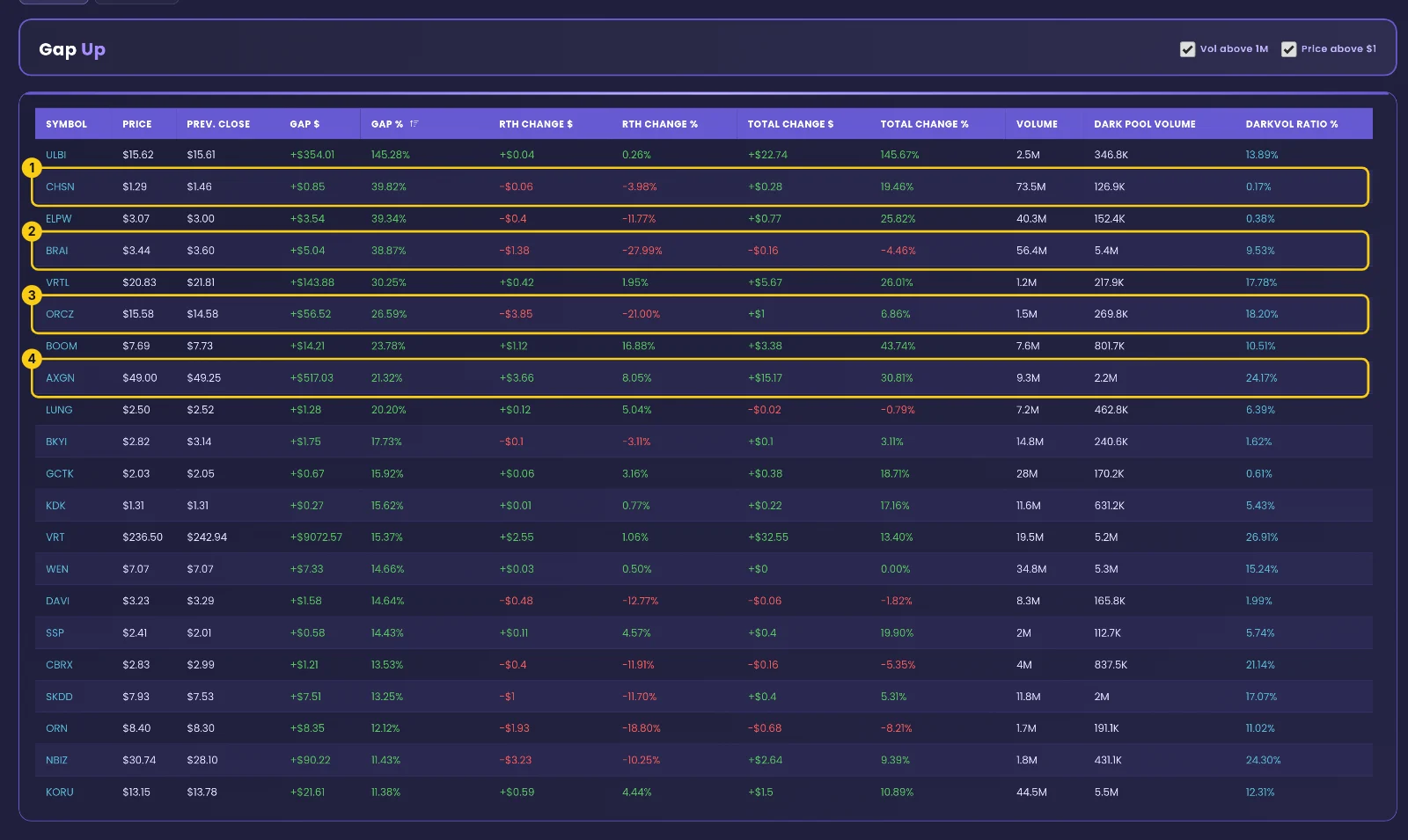
This is the exact routine, with the real screens from the latest data. The yellow numbers show where to look.
Scan the top rows and compare gap with RTH change
Open the Gap Up Scanner with Vol above 1M and Price above $1 ticked. Row (1) gapped 39.82% but shows -3.98% RTH change on 73.5M shares, with a DarkVol ratio of just 0.17%: a mild fade, almost all on the public tape. Row (2) gapped 38.87% but shows -27.99% RTH change and -4.46% total: the gap was fully given back. Row (3) gapped 26.59%, then -21.00% RTH change, leaving 6.86% total with an 18.20% dark ratio.
Row (4) is AXGN: a 21.32% gap, 8.05% RTH change, 30.81% total, 9.3M shares and a 24.17% DarkVol ratio. That is the gap-and-go pattern in one row.
Check volume and dark share on the names you follow
Skip down to the large names. VRT shows 19.5M shares and a 26.9% ratio. KORU shows 44.5M shares and a 12.3% ratio. A gap with heavy volume and a high dark share is a stronger reading than a gap on thin, all-public volume.
Narrow the list with Filters
Open Filters and set a minimum Total Volume to keep only busy names. Add a Call Volume or Put Volume range if you want gappers with active options trading.
Compare with the other side
Open the Gap Down Scanner to see which names opened lower. A market with many big gap ups and few gap downs reads differently from one with both.
Check again before the close
Come back later in the day. Watch whether RTH change on your names has turned from positive to negative, or the other way. A gap that held in the morning can fade by the afternoon.
Reading the page in plain English
Put the columns together and each row tells a short story. Gap shows the opening vote. RTH change shows what happened next.
- If GAP % and RTH CHANGE % are both positive, as with AXGN, the page reads as a gap that extended after the open.
- If RTH CHANGE % is near flat, as with VRT at +1.06%, the page reads as a gap that held without follow-through.
- If RTH CHANGE % is deeply negative, as with row (2) at -27.99%, the page reads as a gap that faded.
- If a big gap comes with heavy volume, as with KORU at 44.5M, the page reads as broad participation.
- If the DarkVol ratio is high, as with VRT at 26.9%, the page reads as a move with a large off-exchange share.
- If the DarkVol ratio is near zero, as with row (1) at 0.17%, the page reads as a move traded almost entirely on the public tape.
What this data cannot tell you
- Direction. A gap that is holding now can still fade later. The table shows what has happened, not what comes next.
- Timing. The scanner shows the move so far. It does not say when a gap will stall or when a fade will stop.
- The reason. The table shows the size of a gap, not the news behind it. Check the story yourself before reading too much into a row.
Common mistakes
- Reading GAP % alone. A row can gap 38.87% and still end negative in total, as row (2) shows.
- Ignoring volume. A big gap on light volume is a thin reading; check VOLUME before trusting it.
- Unticking Price above $1 and Vol above 1M without reason. Penny stocks and thin names can crowd the top with extreme percent moves.
- Treating a high DarkVol ratio as a direction signal. It shows where shares traded, not whether they were bought or sold.
- Checking once and walking away. RTH change keeps moving through the day; a holding gap can turn into a fade.
Tools used in this post
These EZPZ tools help you read gaps alongside range, dark pool and volatility data.
Which plan you need
| Tool | Plan | Free delayed page |
|---|---|---|
| Gap Up and Down | Pro | Yes |
| DarkVol Leaders | Pro | Yes |
| Range Change Leaders | Pro | Yes |
| Historical Volatility | Pro | Yes |
| Intraday Regime Leaderboard | Premium | None |
FAQ
What is the difference between GAP % and TOTAL CHANGE %?
GAP % is only the jump from the previous close to the open. TOTAL CHANGE % is the full move from the previous close, including everything after the open. AXGN shows 21.32% and 30.81%.
How do I know if a gap is holding?
Look at RTH CHANGE %. Positive or flat means the gap is holding or extending. Negative means it is fading.
What does the DarkVol ratio tell me?
It shows how much of the volume traded off the public exchanges. VRT's 26.9% means more than a quarter of its shares traded that way. It does not show direction. For more on dark pool trading, see our dark pool live flow guide or DarkVol Leaders.
What do the Vol above 1M and Price above $1 boxes do?
Vol above 1M hides stocks with 1M shares traded or less. Price above $1 hides stocks priced under $1. Both help keep thin names off the top of the list.
Can I see stocks that gapped down?
Yes. The Gap Down Scanner uses the same layout for stocks that opened lower.
How does EZPZ rank or compute these columns?
EZPZ's method is proprietary. The scanner is built for reading: each column shows what it is labelled as, and the table ranks the biggest gaps first.