How to read unusual options activity: sweeps, blocks and direction labels.
The largest flagged trade in the latest data is a SOXX 460 put block for +$950.0K, labeled BEARISH. Yet a QQQ 696 put block for +$332.4K reads BULLISH. Here is how to read every row, filter and label on the Unusual Activity tab.
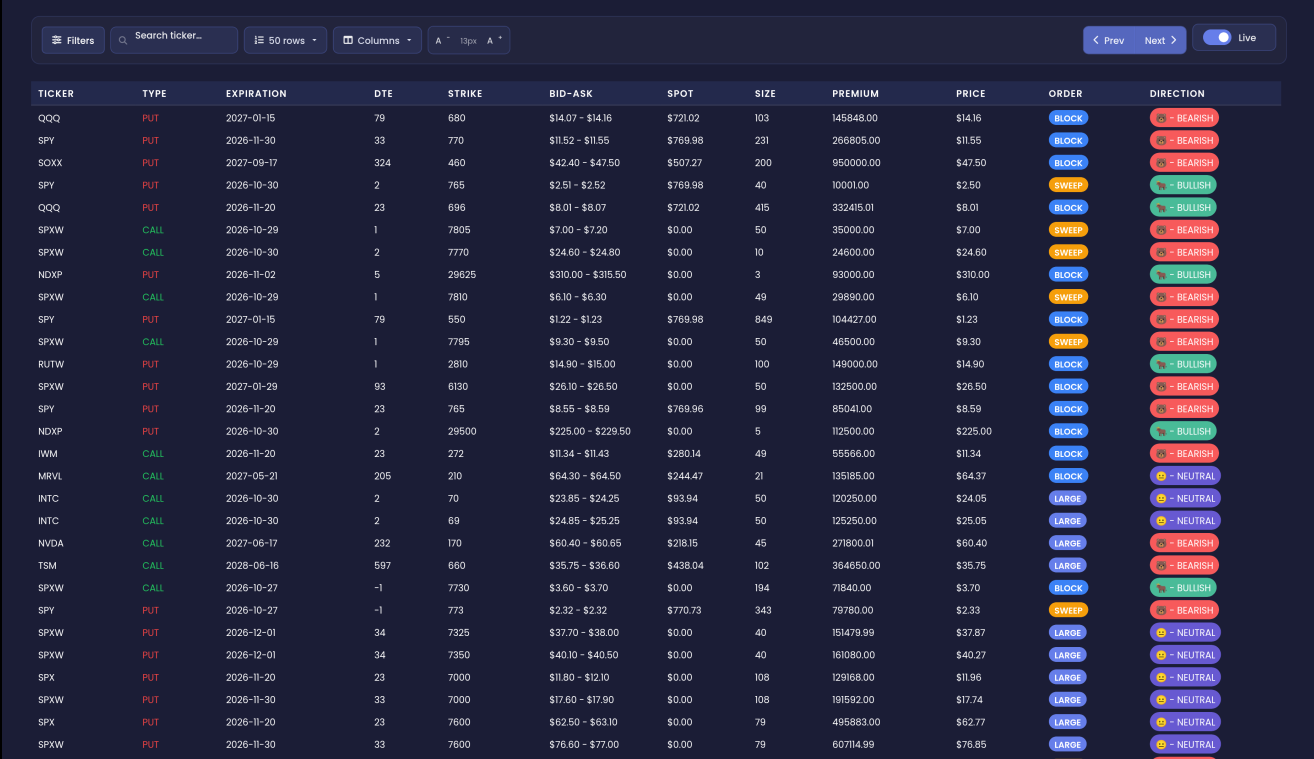
Across the 50 visible rows of the latest unusual options activity, trades labeled bearish carry +$3.75M of premium. Bullish trades carry +$927.6K. The largest single flagged trade is a SOXX 460 put block for +$950.0K, and the newest row is a QQQ $680 put block for +$145.8K. Both are labeled BEARISH. When big money starts leaning one way in the most-followed names, swing traders want to know early. This tab shows those trades one row at a time.
You can follow along on the live Unusual Activity tab. No account? The free delayed Unusual Activity page shows the same layout.
Quick definition first. Unusual options activity is an options trade that stands out from what that contract normally does: bigger, faster or more aggressive than usual. Every row on this tab is already one of those trades. A few terms you will see on every row:
- Premium: the total dollars paid for the trade. It is the best single measure of how much money is behind a row.
- DTE: days to expiration. 0 means the option expires the same day.
- LARGE: a trade whose size or premium stands out sharply for that contract.
- SWEEP: an order that was filled fast and aggressively. It signals urgency.
- BLOCK: one large single print. It usually reads as deliberate positioning.
- Direction: EZPZ's label for the trade's sentiment: BULLISH, BEARISH or NEUTRAL. EZPZ's method is proprietary.
+$950.0K
+$3.75M
+$5.49M
What unusual activity helps you see
A normal options feed is mostly noise. Thousands of small trades print every hour. This tab skips that noise. It lists only trades that already stand out, so every row deserves a look.
Size, speed and intent in one row
Each row tells you three things at once. How much money (premium and size). How it hit the market (LARGE, SWEEP or BLOCK). And how EZPZ reads it (the direction label). Put together, they help you tell an urgent bet from a quiet, planned position.
- SWEEP rows read as urgency: someone wanted the fill now.
- BLOCK rows read as deliberate: one large, planned print.
- LARGE rows read as size that is far out of line for that contract.
Put or call is not the same as bullish or bearish
Many traders read every put as bearish. This tab shows why that is a mistake. In the latest data, a QQQ 696 put block for +$332.4K is labeled BULLISH. A TSM 660 call for +$364.6K is labeled BEARISH. The direction label reads the trade, not just the contract type. Always read the Direction column before you read the C/P column.
The time frame matters
DTE tells you what kind of view a trade carries. The TSM 660 call has a DTE of 597. That is a long-dated position. The SPX 7600 put has a DTE of 23. Across the visible rows, only 1 trade is 0DTE, with +$11.5K of premium. So the latest flagged money leans toward weeks and months, not same-day bets.
Walking through the Unusual Activity tab
The tab is simple: a toolbar on top, a filter panel that opens from a button, and the list of flagged trades below.
Toolbar
The toolbar sits above the table. From left to right:
- Filters: opens the Unusual Activity Filters panel (below).
- Search box "Search ticker…": type a symbol such as QQQ to see only that ticker's flagged trades.
- 50 rows: how many trades show on one page. The examples in this post come from 50 visible rows.
- Columns: choose which table columns to show or hide.
- A - and A +: make the table text smaller or larger.
- Prev and Next: move between pages of flagged trades.
The flagged trades list
Each row is one flagged options trade, with the newest at the top. The fields you read on every row:
- Time: when the trade printed. Newest first.
- Ticker: the underlying symbol, such as QQQ or SOXX.
- Type: CALL or PUT.
- Expiration: the option's expiry date.
- DTE: days left until expiry.
- Strike: the option's strike price.
- Size: the number of contracts.
- Premium: the total dollars in the trade. Compare it to what is normal for that ticker.
- Order: LARGE, SWEEP or BLOCK.
- Direction: BULLISH, BEARISH or NEUTRAL.
Read a row from left to right. Take the top trade by premium: SOXX, PUT, expiring 2027-09-17, DTE 324, strike 460, size 200, premium +$950.0K, BLOCK, BEARISH. In plain English: a single, deliberate print of 200 long-dated SOXX puts, and EZPZ reads it as bearish.
Now the newest row: QQQ, PUT, expiring 2027-01-15, DTE 79, strike $680, size 103, premium +$145.8K, BLOCK, BEARISH. Another deliberate put block, this time in the most-followed name on the page.
Across the visible rows there are 23 LARGE, 9 SWEEP and 18 BLOCK trades. Puts lead calls: 29 put trades for +$5.49M against 21 call trades for +$2.56M.
Notice the SPXW and SPX rows. Both are 7600 puts, size 79, LARGE, labeled NEUTRAL. A NEUTRAL label on a big index put means EZPZ does not read a clear lean from that trade alone.
Unusual Activity Filters
Click Filters in the toolbar to open this panel. Each control narrows the table:
- Option Type: show calls, puts or both.
- Direction: show only BULLISH, BEARISH or NEUTRAL trades, or all.
- Activity Type: show LARGE, SWEEP or BLOCK. Pick more than one to combine them.
- Premium: set a minimum and maximum dollar premium. Raise the minimum to hide smaller trades.
- Strike Price: set a strike range, useful when you only care about strikes near the current price.
- Volume: set a minimum and maximum contract size.
With no filters active, the table shows all flagged activity. That is the view used in this post.
How to use Unusual Activity on EZPZ: a 5-minute routine
This is the exact routine, built on the latest data.
Start with the full, unfiltered list
Open the Unusual Activity tab with no filters. Scan the Direction column first. In the latest data, BEARISH rows outnumber BULLISH ones, 23 to 7. That is your first read of the tone.
Find the biggest money
Look for the largest premiums. Here the top trade is the SOXX 460 put for +$950.0K, then the SPXW 7600 put for +$607.1K. Raise the Premium minimum in Filters to keep only trades this size.
Check your names with the search box
Type QQQ into "Search ticker…". You will see the $680 put block for +$145.8K labeled BEARISH and the 696 put block for +$332.4K labeled BULLISH. Two put blocks, two different reads. Look at both before you form a view.
Isolate urgency
Set Activity Type to SWEEP. Across the visible rows there are 9 sweeps. These are the trades where someone wanted a fast fill. Then switch to BLOCK to see the 18 deliberate single prints.
Check again before the close
Come back later and look at the top of the list. New rows land at the top. Notice whether the direction labels keep leaning the same way or start to change.
Reading the page in plain English
- If BEARISH rows and premium outnumber BULLISH ones, as with +$3.75M against +$927.6K here, the page reads as flagged money leaning defensive.
- If the largest trade is a long-dated BLOCK, like the SOXX 460 put with DTE 324, the page reads as a planned position, not a same-day bet.
- If a put row is labeled BULLISH, like the QQQ 696 put, the page reads that trade as bullish despite the contract type.
- If big index puts are labeled NEUTRAL, like the SPX and SPXW 7600 puts, the page reads them as having no clear lean on their own.
- If almost no rows are 0DTE, as with 1 trade here, the page reads as flagged money focused on longer expiries.
What this data cannot tell you
- Direction. A bearish label describes one trade. It does not say where QQQ or SOXX goes next.
- Timing. A put with DTE 324 can sit for months. The row does not tell you when, or if, the view plays out.
- The full position. One row is one trade. It does not show whether it is a hedge, part of a larger spread or a new bet.
Common mistakes
- Reading every put as bearish. The QQQ 696 put block is labeled BULLISH. Check Direction.
- Comparing premium across tickers as equals. A given premium means more on a smaller name than on SPX or QQQ.
- Ignoring DTE. A 597-day TSM call and a 0DTE trade carry very different views.
- Chasing one row. One flagged trade is a clue, not a signal to copy.
- Forgetting active filters. If the table looks thin, check the Filters panel before reading the tone.
Tools used in this post
These EZPZ tools pair well with the Unusual Activity tab.
Which plan you need
| Tool | Plan | Free delayed page |
|---|---|---|
| Unusual Options Activity | Pro | Yes |
| 0DTE Flow | Pro | None |
| $1M Plus Flow | Pro | None |
| Live Flow | Pro | None |
| SPX & SPY Flow | Pro | None |
| Unusual Activity Intraday | Pro | Yes |
FAQ
What makes a trade "unusual" on this tab?
It stands out from that contract's normal activity in size, speed or aggression. EZPZ's method is proprietary.
What is the difference between LARGE, SWEEP and BLOCK?
LARGE means the size stands out for that contract. SWEEP means a fast, urgent fill. BLOCK means one large, deliberate print.
Can a put be labeled bullish?
Yes. In the latest data, a QQQ 696 put block for +$332.4K is labeled BULLISH. The label reads the trade, not only the contract type.
How do I see only one ticker?
Type it into the "Search ticker…" box in the toolbar. The table then shows only that ticker's flagged trades.
How do I hide small trades?
Open Filters and raise the Premium minimum, or the Volume minimum for contract size.
Is there a free version?
Yes. The free delayed Unusual Activity page shows the same tab on a delay.