Learn Center
0DTE Flow
Live options prints that expire today, with DTE already locked so you are not mixing in weeklies and monthlies.
What is 0DTE options flow?
0DTE options flow is the live tape of listed options prints that expire the same trading day. 0DTE means zero days to expiration. These contracts have almost no time value left, so price moves mostly with the underlying. This view keeps only the same-day rows.
Reading a row is the same job as any live options tape. Premium and size tell you whether enough capital moved to care. Side tells you whether the fill leaned toward the ask, the bid, or the middle. Order tags describe how it executed, not why. On this tape the expiration is already today, so you are not hunting weeklies or monthlies in the same list.
Same-day options can look cheap in dollars and still move fast. A sweep at the ask is urgency on a clock that ends at the close. Size still does not tell you who traded, or whether it was a hedge, a scalp, or a directional bet. Repeated prints on the same strike in a short window are usually a stronger prompt than a single row.
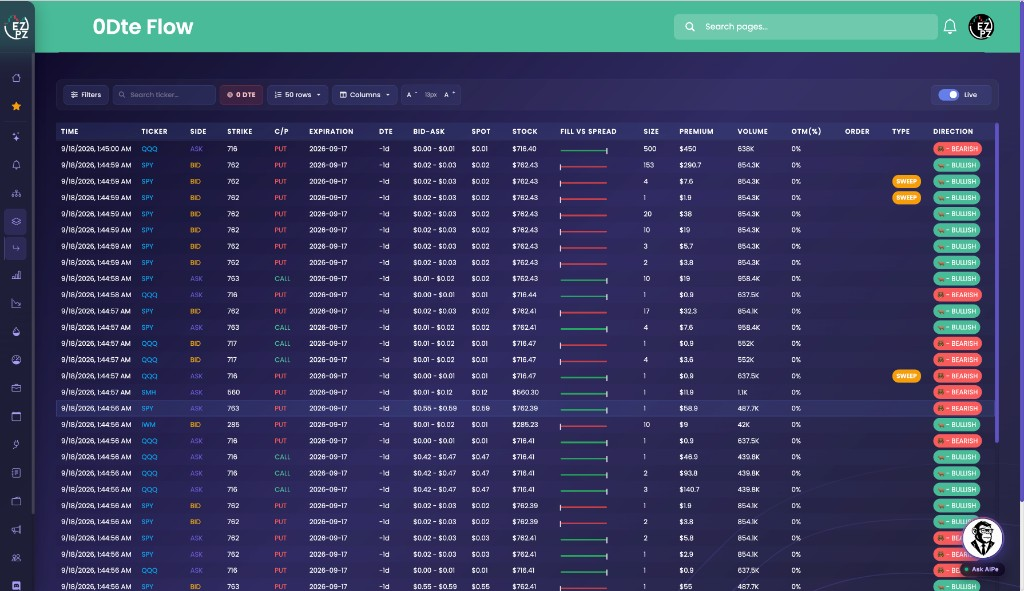
On EZPZ, 0DTE Flow is that tape with expiration already locked. The live page is titled 0Dte Flow. The toolbar badge says 0 DTE. The Filters drawer says DTE locked to 0, expires today. You can search a ticker. You cannot change DTE. 0DTE Graph is the same-day premium chart, not this tape. Live Flow is the full tape. Unusual Activity keeps only large, sweep, and block prints. Unusual Activity Intraday is the session scan with a date range. $1M Plus Flow keeps only million-dollar premium. SPX and SPY Flow locks the same tape to SPX, SPXW, and SPY. Option Chain is the contract book for one ticker, not the tape.
How 0DTE Flow works on EZPZ
Each row is one same-day print: the contract, the size, the premium, and the tags that describe how it traded. It is not a score. Most people start with ticker, SIDE, C/P, and DIRECTION. If a row looks interesting, read PREMIUM, TYPE, and OTM next. When the list is too much, filter to a ticker you already care about, turn Normal off, or raise the premium floor.
How this differs from Live Flow
Live Flow shows every matching expiration. This page cannot. The 0 DTE badge in the toolbar is the universe. Use Live Flow for weeklies and monthlies. Use this page for same-day flow. Use Unusual Activity when you only want Large, Sweep, and Block. Use $1M Plus Flow when you only want million-dollar premium. Use SPX and SPY Flow when you only care about S&P 500 positioning. Use Option Chain when you want the listed strikes, not the prints.
Anatomy of a print
Read a row left to right: when it printed, what traded, then how it was executed. You do not need every column on every print. Use the tabs if you want a map of the fields.
These columns answer what printed, and when.
| Column | What you are looking at |
|---|---|
| TIME | When the print hit the tape. |
| TICKER | The underlying. Click it to open that name's option chain on EZPZ. Search ticker lives in the toolbar too. |
| SIDE | ASK, BID, or MID. That is where the fill sat versus the quote. |
| STRIKE C/P | Strike price, and whether it is a CALL or a PUT. |
| EXPIRATION DTE | Expiration date and days left. On this page that is already locked to today. There is no DTE range in Filters. |
These columns help you decide if the same-day print is large enough to spend time on.
| Column | What you are looking at |
|---|---|
| SIZE | How many contracts printed. Read it next to premium, not by itself. |
| PREMIUM | Dollar premium. Same-day contracts can print cheap. Raise the min in Filters if the list is noisy. |
| VOLUME | Volume on that contract. |
| OTM(%) | How far the strike is from the underlying, as a percent. |
| BID-ASK SPOT | The quoted spread, and the option fill on the row. |
| STOCK | The underlying price at the print. |
| FILL VS SPREAD | A bar showing where the fill landed in the spread. Green leans toward the ask. Red leans toward the bid. |
Tags describe the print. They do not score it, and they do not tell you the trader's reason.
| Column | What you are looking at |
|---|---|
| ORDER | Extra markers when we have them. |
| TYPE | How the print was classified when we have it: Floor, Sweep, or Cross. Normal does not show a badge. |
| DIRECTION | Bullish, bearish, or neutral label on the row. |
Filter the tape
Click Filters in the toolbar. You cannot add another expiration. The drawer already says DTE locked to 0, expires today. Use it to cut the same-day tape down to a ticker, calls, puts, sweeps, or a premium screen. Reset puts every toggle back on and clears the ranges.

Toggles
- Option type: Calls and puts, on or off independently. Scroll up in the drawer if you do not see it yet.
- Direction: Bullish, bearish, and neutral row labels.
- Order type: Normal, Floor, Sweep, and Cross. Turn Normal off if you only want classified prints.
Ranges
- Search ticker: Limit the tape to one underlying. The same search also lives in the toolbar.
- Strike, premium, volume, size, spot, OTM (%): Min and max. Leave a field empty and there is no cap on that side (shown as infinity).
On the toolbar you can also change how many rows you see (50 is a common setting, up to 500), which columns are visible, and the text size with A- / A+.
Stay live
The right side of the toolbar is a single switch:
- Live: newer matching prints can show up during market hours.
- Paused: the tape freezes so a row does not scroll away while you read it.
There is no Prev / Next on this page. If you pause, you are sitting with the rows already on screen.
How people actually use it
Watch same-day flow
Leave ticker search empty. Keep Live on beside an index or mega-cap chart. You are listening for today, not next month.
Watch one name
Filter to a ticker already on your radar. The expiration stays locked to today. You will not see further-dated prints here.
Hunt sweeps before the close
Turn Normal off. Leave Sweep on. Raise the premium floor if cheap contracts are drowning the list.
Use it next to the full tape
This page is the same-day slice. Open Live Flow if a row makes you want other expirations. Open 0DTE Graph if you want the same-day premium chart. Open $1M Plus Flow if you only want million-dollar premium.