How to read Option Depth Flow: GEX, VEX, CEX and DEX by strike over time.
In the latest data, SPY at 773.09 sits $0.59 above its $772.50 gamma flip and $1.91 below a $775 gamma wall worth 223.6M. Here is how to read every control on the Option Depth Flow toolbar.
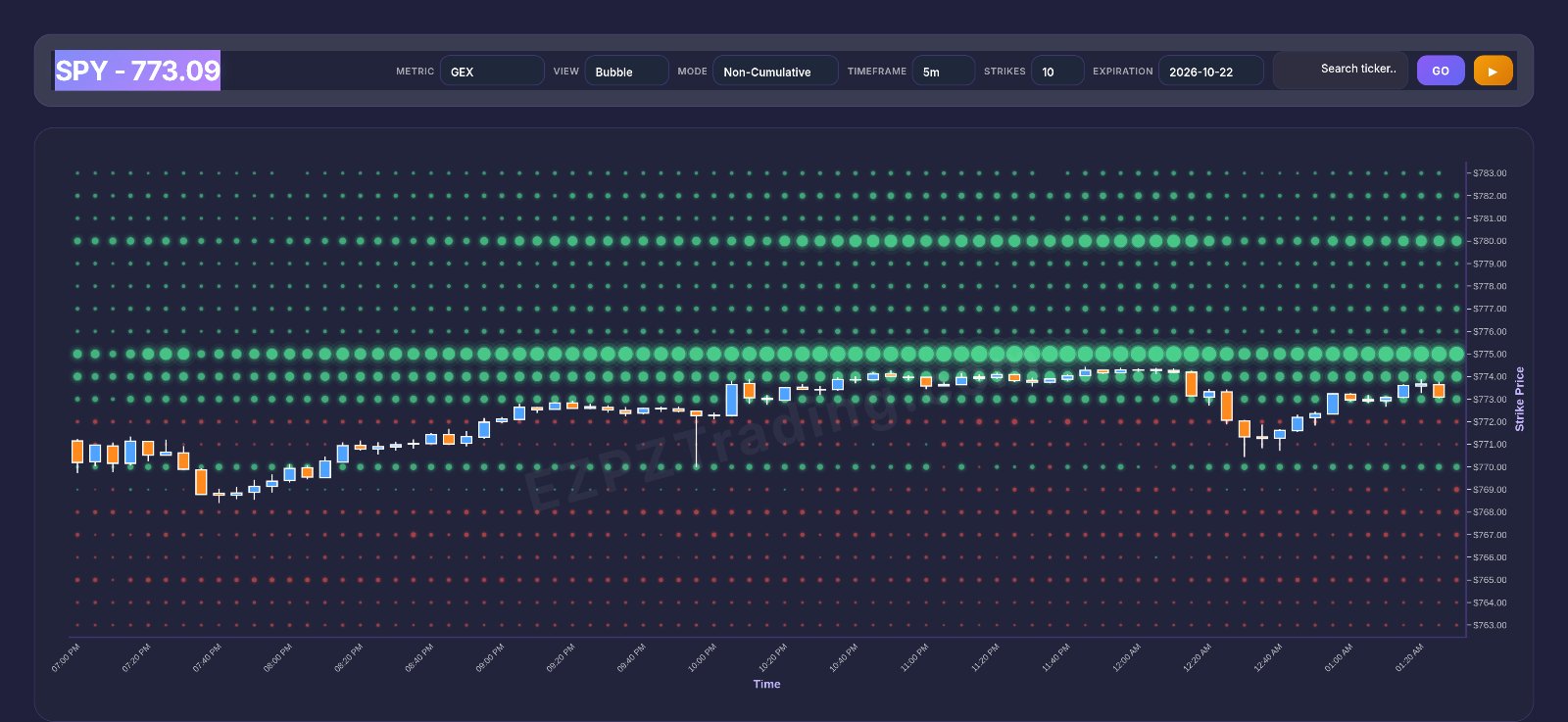
In the latest data, SPY trades at 773.09, wedged between two key gamma levels. The biggest call-side gamma strike, $775, sits $1.91 above price with 223.6M of net GEX. The gamma flip at $772.50 is only $0.59 below. When price sits that close to both a wall and a flip, small moves can change how the chart reads. That is what Option Depth Flow is for.
Quick definition first. Option Depth Flow plots dealer exposure per strike across time. You pick one measure at a time. GEX (gamma exposure) shows how hedging reacts to price moves. VEX (vanna exposure) shows how hedging reacts to changes in implied volatility. CEX (charm exposure) shows how hedging shifts just from time passing. DEX (delta exposure) shows raw directional hedging at each strike. A wall is the strike with the largest positive net value. The neg wall is the strike with the largest negative net value. The flip is where net exposure changes sign.
$775
$772.50
702.6M
The idea behind Option Depth Flow
Most exposure charts show one picture: exposure by strike, right now. Option Depth Flow adds time. Strikes run up the side. Time runs across. So you see not just where exposure sits, but how it builds and fades as the day goes on.
That matters for swing traders too. A wall that keeps growing is a level dealers are hedging more and more. A wall that shrinks is losing its grip. Both are worth knowing before you act on a level.
Four measures, four questions
- GEX asks: does dealer hedging calm price or push it? Positive (call-side) gamma tends to go with range-bound, mean-reverting trade. Negative (put-side) gamma tends to go with faster, trending moves.
- VEX asks: where would a jump or drop in implied volatility shift hedging most? It matters most around volatility events. Its sign is a concentration read, not a calm-or-push call.
- CEX asks: where does time alone shift hedging? It usually matters more late in the day and on near-dated expirations. It is often linked to pinning near big strikes.
- DEX asks: how much directional hedging sits at each strike? It is a straight positioning read with no regime story.
Why the flip is the key line for GEX
With GEX active, the flip is a regime pivot. Above it, the chart reads as stabilizing. Below it, it reads as amplifying. In the latest SPY data, price at 773.09 sits just above the $772.50 flip. That is a reading on a knife edge, not a comfortable cushion.
What the green and red mean
Green means the call side dominates a strike's net value. Red means the put side dominates. Bigger means more exposure. The white line is the price path over the same time, so you can see price walk past each level.
Walking through the tab, top to bottom
Everything on Option Depth Flow is driven from one toolbar above the chart. Each control changes what the plot shows. Here is each one, in order.
Toolbar
The toolbar reads, left to right: GEX VEX CEX DEX GRAVITY 👑 · Bubble Gradient · Cumulative Non-Cumulative · 1m 5m 10m 15m 30m · 4 6 8 10 12 15 20 · a search box marked "Search ticker..." · GO.
Metric buttons: GEX, VEX, CEX, DEX and GRAVITY 👑. These pick the measure the chart plots. Only one is active at a time. Always check which one is lit before you read anything, because each is read differently. The latest SPY data has GEX active. GRAVITY 👑 is the crown-marked option at the end of the row. Read it as its own view, not as one of the four Greeks.
Bubble / Gradient. Bubble draws a dot for each strike and time step, sized by exposure. Gradient draws the same data as a smooth heat map. Bubble is easier for spotting one big strike. Gradient is easier for seeing bands and zones.
Cumulative / Non-Cumulative. Cumulative shows exposure building up over time at each strike. Use it to find the dominant wall. Non-Cumulative shows the values for each time step on their own. Use it to see where fresh positioning was added or removed. The latest SPY data is in Non-Cumulative mode.
Timeframe: 1m, 5m, 10m, 15m, 30m. This sets how wide each time step is on the horizontal axis. 1m gives the finest detail and the most noise. 30m gives a cleaner, slower view. The latest SPY data uses 5m.
Strike count: 4, 6, 8, 10, 12, 15, 20. This sets how many strikes the chart shows around price. Fewer strikes zoom in on the levels next to price. More strikes show walls further away. The latest SPY data shows 10 strikes.
Search box and GO. Type a ticker into "Search ticker..." and press GO to load it. Every other setting then applies to that ticker.
Here is how the latest SPY ladder looks by strike, with GEX active.
SPY net GEX by strike
Read it top to bottom. Above price, every strike is positive. $775 is the largest at 223.6M, with 279.4M on the call side against 55.8M on the put side. $774 at 146.3M and $780 at 140.6M come next. Just below price, $772 turns negative at -34.6M. That sign change is why the flip sits at $772.50. Lower down, $769 is the neg wall at -52.6M, all of it put-side (C: 0 / P: 52.6M). It sits $4.09 (0.53%) below price.
One detail is worth a look. $770 is positive again at 74.3M, inside a mostly red zone. The ladder below price is mixed, not cleanly red. The $775 wall holds 17.8% of total absolute GEX on the ladder, so it is the single biggest strike but far from the whole picture.
How to use Option Depth Flow on EZPZ: a 5-minute routine
This is the exact routine, with the real readings from the latest data.
Load the ticker and pick the metric
Open Option Depth Flow, type SPY in "Search ticker..." and press GO. Select GEX first, because it carries the regime story. Note the current price, 773.09 in the latest data.
Find the wall in Cumulative mode
Switch to Cumulative and look for the largest green strike. In the latest SPY data the gamma wall is $775 at 223.6M, $1.91 above price. That is the biggest call-side concentration on the ladder.
Find the neg wall and the flip
Scan down for the largest red strike. Here it is $769 at -52.6M. Then find where green turns red as you move down. For SPY that is $772.50, and price sits above it by $0.59. Price is above the flip, but only just.
Switch to Non-Cumulative to see fresh activity
Toggle Non-Cumulative and stay on 5m. Watch whether the newest time steps keep adding green at $775 or red near $769. Growth at a strike means positioning is still concentrating there.
Cross-check with CEX and VEX
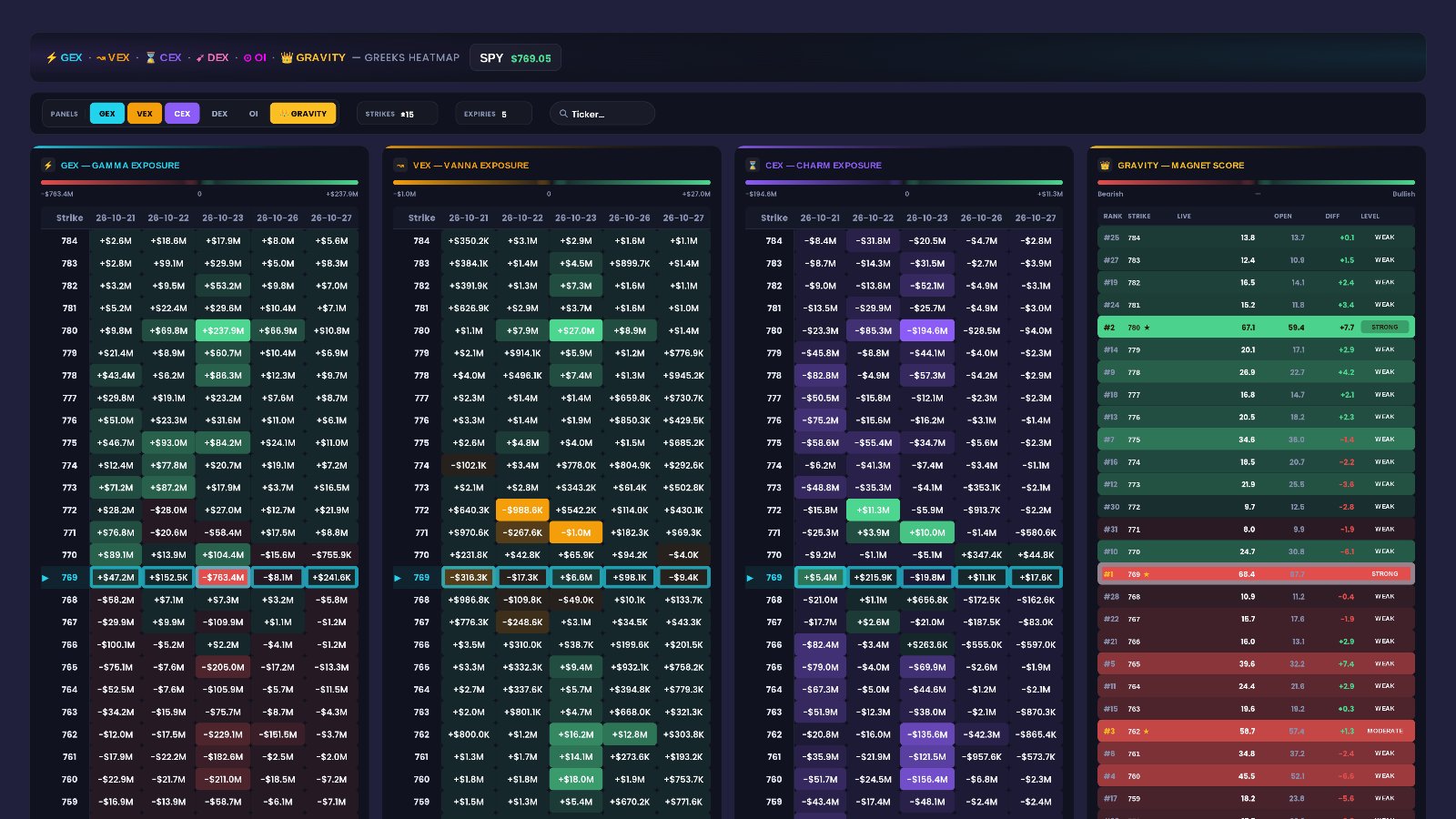
Click CEX to see where time-driven hedging clusters, and VEX for volatility-driven hedging. If the same strikes keep showing up, that level matters across several measures. Then compare with the Expected Move range for context.
Check again before the close
Come back late in the day. Charm effects tend to show more near the close, and a flip this close to price can move. Recheck the wall, the flip and which side of the flip price is on.
Reading the page in plain English
Put the pieces together. With GEX active, SPY at 773.09 is above the flip, below the wall, and the ladder carries far more positive gamma (980.5M) than negative (-277.9M). Here is how different readings translate.
- If price is above the gamma flip and below a large green wall, the page reads as a call-side gamma zone with a nearby ceiling. That is the latest SPY picture.
- If price slips below the flip into the red strikes, the page reads as a put-side gamma zone, where moves tend to be less damped.
- If the wall keeps growing in Non-Cumulative mode, the page reads as positioning still building at that strike.
- If the wall fades step after step, the page reads as that level losing concentration.
- If CEX shows a big cluster at the same strike late in the day, the page reads as a stronger pinning candidate there.
- If the ladder is mixed, like $770 sitting green between red strikes, the page reads as a choppy zone without one clean boundary.
What this data cannot tell you
- Direction. A wall above and a flip below describe dealer positioning. They do not say which way SPY goes next.
- Timing. The chart shows where exposure sits and how it changes. It cannot say when price reaches a level, or if it ever does.
- Who is on the other side. The plot shows net call and put exposure per strike. It does not show who opened the trades or why.
Common mistakes
- Reading VEX, CEX or DEX like GEX. Only GEX carries the stabilizing vs amplifying story; the others are concentration reads.
- Finding walls in Non-Cumulative mode. Use Cumulative for the dominant wall and Non-Cumulative for fresh activity.
- Treating a flip $0.59 away as a safe cushion. At that distance, a small move puts price on the other side.
- Showing too few strikes. With 4 strikes you may miss a wall like $780 sitting further out.
- Ignoring the timeframe. 1m and 30m views of the same ticker can look very different; compare like with like.
Tools used in this post
These EZPZ tools help you read dealer exposure and the moves around it.
Which plan you need
| Tool | Plan | Free delayed page |
|---|---|---|
| Option Depth Flow | Premium | None |
| 0DTE Graph | Pro | Yes |
| 7-DTE Graph | Pro | Yes |
| Net Premium Heatmap | Pro | Yes |
| Expected Move | Pro | Yes |
| GEX Heatmap | Premium | None |
FAQ
What is Option Depth Flow?
It is an EZPZ chart that plots dealer exposure (GEX, VEX, CEX or DEX) per strike across time, with the price path drawn over it.
Where is the SPY gamma wall in the latest data?
At $775, with 223.6M net GEX, $1.91 (0.25%) above price at 773.09. The neg gamma wall is $769 at -52.6M.
Should I use Cumulative or Non-Cumulative?
Cumulative to find the dominant walls. Non-Cumulative to see where fresh positioning is being added or removed in recent time steps.
How is this different from a single gamma exposure chart?
A static chart shows exposure by strike at one moment. Option Depth Flow adds time, so you can watch walls build or fade. For the static view, see how to read gamma exposure, and for a strike-by-time heat view, the Greeks heatmap guide.
How does EZPZ work out these values?
EZPZ's method is proprietary. The page shows the readings and this guide explains how to read them.
Which timeframe should I start with?
5m is a balanced start, and it is what the latest SPY data uses. Move to 1m for detail or 30m for a cleaner view.