Learn Center
Promote and Earn
Submit a public link to your educational post about EZPZ Trading and earn ZPZ coins once an admin approves it.
What is Promote and Earn, and how do you earn ZPZ coins on EZPZ?
Promote and Earn is the EZPZ page where a signed-in member submits a link to a social media post about EZPZ Trading and earns ZPZ coins if an admin approves it. It is a submit-and-review program, not a referral link program. Nothing is tracked automatically. You post, paste the proof link, and a person reviews it.
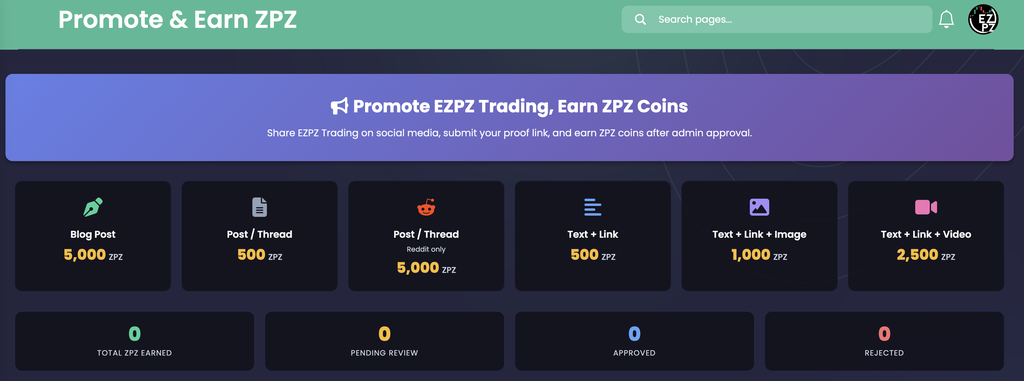
Six reward cards at the top show what each kind of post pays. In the capture a Blog Post pays 5,000 ZPZ, a Post / Thread pays 500 ZPZ (5,000 ZPZ on Reddit only), Text + Link pays 500 ZPZ, Text + Link + Image pays 1,000 ZPZ and Text + Link + Video pays 2,500 ZPZ. Below them, four counters show your Total ZPZ Earned and how many submissions are Pending Review, Approved and Rejected. The rest of the page holds the Submission Guidelines, the Submit New Promotion form and your Submission History. The page says coins arrive only after admin approval, so a submission that is still pending has earned you nothing yet.
How Promote and Earn works on EZPZ
The page needs a signed-in EZPZ account. Any plan can open it, and logged-out visitors are sent to the login page. The reward cards, counters and history load with the page and do not refresh on their own, so reload after you submit or after a review. A successful submission reloads the page with a success message that names the ZPZ coins you will earn once approved.
The flow has four steps.
- Post: publish something useful about trading or options on a social platform. Read the guidelines first, because a post that breaks them is rejected.
- Submit: paste the public link to the post, pick a Content Type and a Platform, optionally add a short description, and press Submit for Review.
- Wait: the submission shows as Pending Review in your history. The reward it will pay is shown beside it.
- Get the result: an admin approves it, and the coins are added to your ZPZ balance, or rejects it with a reason. Either way the page shows the outcome in your history.
The capture was taken on an account with no submissions, so every counter reads 0. The guidelines, the form and the history table were below the fold, so they are described from the page's own text in the sections that follow, without example rows.
How Promote and Earn differs from the rest of Account and Portfolio
This page pays coins for posts you publish. It is not a referral program and it has no personal link or code to share. ZPZCoin Portfolio is where you read your coin balance, staking rewards and purchase rules, so it is the place to read your overall balance. Connect to ZPZcoin is the single sign on link to the separate ZPZcoin platform. Partners is the dashboard for a more structured creator or community arrangement, and AI Portfolio Analysis reviews your own trade history. Trading Discord is the community. The page has no market data in it. For that, start from the Learn Center hub or Ticker Explorer.
The reward cards: what each kind of post pays
The six cards are the current rate card. They are not fixed text. EZPZ can change a rate or add a content type, so treat the card as the rate at the moment you open the page. Each card shows an icon, the content type, a smaller line when the rate is platform specific, and the coins in ZPZ.
| Card | Pays in the capture | How to read it |
|---|---|---|
| Blog Post | 5,000 ZPZ | An article on a blog. This is the one content type where the guidelines ask you to link to EZPZ Trading. |
| Post / Thread | 500 ZPZ | A social post or thread on any platform other than Reddit. |
| Post / Thread with "Reddit only" | 5,000 ZPZ | The same content type on Reddit. It pays ten times the base rate, 5,000 against 500. |
| Text + Link | 500 ZPZ | A text post that carries a link. |
| Text + Link + Image | 1,000 ZPZ | The same post with an image added. |
| Text + Link + Video | 2,500 ZPZ | The same post with a video added. |
The two Post / Thread cards are one content type with two rates. The Content Type menu in the form lists Post / Thread once. The higher rate applies when you set Platform to Reddit, and the base rate applies for every other platform. A card that says "Reddit only" is a platform rate, not a separate choice in the menu.
The four counters
The counters sit under the reward cards and cover only your own submissions.
| Counter | What you are looking at |
|---|---|
| Total ZPZ Earned | The coins already paid on your approved submissions, in green. It does not include pending rewards. |
| Pending Review | How many submissions are waiting for an admin, in amber. It is a count of submissions, not coins. |
| Approved | How many submissions were approved, in blue. |
| Rejected | How many submissions were rejected, in red. |
The colors are fixed labels for the four counters, not a good or bad signal. Pending Review, Approved and Rejected always add up to the number of rows in your history. In the capture all four read 0.
The Submission Guidelines
The guidelines are seven numbered rules, color coded by type. Read them before you post, since the page says a submission that breaks them is rejected.
| Rule | What the page says |
|---|---|
| 1. Educational or informational content only | The post must give value, such as analysis, tips, insights or education about trading or options. Pure promotional or advertising style posts are rejected. |
| 2. No need to tag EZPZ or link to the website | The watermark on EZPZ screenshots already covers attribution. A link to EZPZ Trading is needed only for a blog post. |
| 3. Use the public link | If the post contains a screenshot, the proof link must point to the public page, even if the public data is delayed and not identical. The page suggests logging out or opening a private window on EZPZTrading.com to find the right URL, warns that a link that needs a login is not accepted, and notes you can share an AI response by public link. |
| 4. No affiliate or referral link | Posts that carry one are rejected. |
| 5. No coupon or promo codes | Posts that carry a discount or promo code are rejected. |
| 6. Twitter / X posts need traction | Your post needs at least 20 likes, or it must be a reply in the comments of a post with 100+ likes. Anything below that is rejected regardless of quality. |
| 7. Consistent quality can earn bonuses | Members who regularly post high quality educational content may get extra rewards if EZPZ reshares their posts on its official channels. |
Rules 4 and 5 matter if you also run a referral program elsewhere. A post that mentions your affiliate link or a discount code fails even when the rest of it is excellent.
The Submit New Promotion form
The form has four fields and one button.
| Field | What to enter |
|---|---|
| Proof URL | The link to your social media post. The placeholder shows a Twitter link as an example. It must be a public URL, per rule 3. |
| Content Type | A menu of the base rate content types from the reward cards, sorted by name. It starts on "Select Content Type" and is required. |
| Platform | A menu of the platforms EZPZ currently accepts, starting on "Select Platform". It is required. Reddit is the platform that changes the Post / Thread rate. |
| Description (optional) | A short note about your post, up to 500 characters. |
| Submit for Review | Sends the submission. It starts as Pending Review. |
Two limits are enforced when you press the button. You cannot submit a URL you already submitted, and the message reads "You have already submitted this URL." You can submit at most 5 promotions in a 24 hour window, and the message reads "You can submit a maximum of 5 promotions per 24 hours." An error shows in red under the field. Because the limit counts everything you sent in the last 24 hours, check that the URL and the Content Type are right before you press Submit, since a mistaken row also uses one of your five.
Your Submission History
The history table lists every submission you have made, newest first. There is no paging or search. With no submissions it shows an empty message that says to share EZPZ Trading on social media and submit your first proof link.
| Column | What you are looking at |
|---|---|
| Date | The day you submitted, for example Sep 21, 2026. |
| Platform | The platform you picked, or a dash if none was stored. |
| Type | The content type label, such as Text + Link + Image. |
| Proof | A View link that opens your post in a new tab. Use it to confirm the post is still public. |
| Status | A badge: Pending Review in amber, Approved in green, Rejected in red. A rejected row adds the reason underneath. |
| Coins | An approved row shows the coins paid with a plus sign in green. A pending row shows the reward amount followed by "(pending)". A rejected row shows a dash. |
| Note | The reviewer's note to you, or a dash when there is none. |
A rejected submission carries one of four reasons.
- Too Aggressive / Marketing
- Spamming
- Low Quality
- No View Opportunity
The page names the reasons but does not define them. Rule 1 is the closest match for Too Aggressive / Marketing, and rule 3 covers a link that needs a login. For anything else, read the Note column for the reviewer's own explanation. EZPZ also emails the address on your account when a submission is approved or rejected, and the email repeats the reviewer's note, so check your inbox as well as the table.
Working the page
- Read the six cards before you write: a Text + Link + Video post pays five times a plain Text + Link post (2,500 against 500), and a Reddit Post / Thread pays ten times the base (5,000 against 500).
- Post something educational: rule 1 is the most common way a submission fails, and a rejection still uses one of your five daily submissions.
- Check the link while logged out: open the proof URL in a private window before you submit. If it needs a login, it fails rule 3.
- Keep affiliate links and codes out: both are automatic rejections.
- Count Twitter / X likes first: 20 likes on your own post, or a reply under a post with 100+ likes.
- Judge by Approved, not Pending: Total ZPZ Earned counts only approved rows, so pending coins are a promise, not a balance.
- Check your balance on ZPZCoin Portfolio: that is where the coin count lives. It does not have a member row named for promotions, so use this page's Total ZPZ Earned to see what Promote and Earn paid.
How people actually use it
Turn posts you already write into coins
Members who post trading ideas on X or Reddit submit the same posts here, as long as they are educational and link nothing to sell.
Write a blog post for the top rate
A Blog Post pays the highest content rate, 5,000 ZPZ, and it is the one type where the guidelines ask you to link to EZPZ Trading.
Fix and resubmit after a rejection
Read the reason and the Note, then fix the post and submit a new link. The same URL is refused twice, so a resubmission needs a new post.
Track what is still pending
Pending Review shows how many are waiting and each pending row shows what it will pay when approved.