Learn Center
EZPZ Trade Alerts
A live feed of notable options and stock activity worth knowing about the moment it happens, instead of discovering it after the fact.
What is EZPZ Trade Alerts?
EZPZ Trade Alerts is a live feed of notable options and stock activity, newest first, updated over a live connection while the tab is open. Each row is a single event: a ticker, when it happened, and why it fired, such as a large options print, a dark pool trade with unusually high premium, or a sudden spike in net premium. It is a scanning tool, not a signal service. A row means the size or the pattern crossed EZPZ's screen for that alert type. It does not mean buy or sell.
The feed sits behind the Filters panel and a Market Segment picker. Alert Type toggles pick which kinds of events can appear. Sentiment, Volume, Premium ($), and Size narrow further. Market Segment limits the feed to certain market cap tiers, or ETFs. Rows update as new alerts arrive; there is no page reload. Trader's FieldMap is a one-ticker price ladder, not a feed. Use Trade Alerts when you want to scan the whole market; use FieldMap when you already picked a ticker and want its levels.
How EZPZ Trade Alerts works
The page header shows a MARKET OPEN or MARKET CLOSED badge. The toolbar has a Filters button, a Market Segment dropdown, a ticker search box, a Sound toggle, and a Live switch. The table columns are TIME, TICKER, SIDE, STRIKE, PRICE, C/P, EXPIRATION, DTE, VOLUME, SIZE, PREMIUM, SENTIMENT, REASON, and EXPLANATION, 50 rows per page with page buttons under the table.
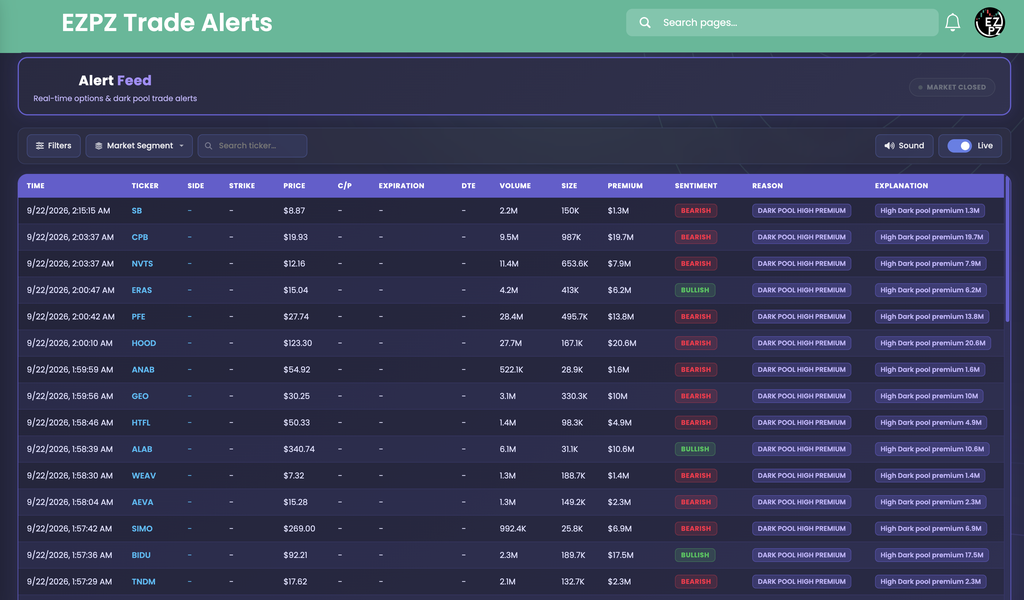
On the screenshot, every visible row reads Reason DARK POOL HIGH PREMIUM, so SIDE, STRIKE, C/P, EXPIRATION, and DTE all print a dash; those fields only fill in on an options print. Explanation repeats the reason in plain words with a compact value, for example High Dark pool premium 19.7M on CPB. Ticker, Sentiment badge, and Reason badge are colored; Volume, Size, and Premium print in compact form (M for millions).
Filters and Market Segment
Filters opens a side panel with three groups. Alert Type is nine toggles: Large Options Contracts, Dark Pool - High Premium, Dark Pool - High Volume, Lit Exchange - High Volume, Lit Exchange - High Premium, Options - High Premium, Net Premium Spikes, Rapid Price Movers (5min), and High Relative Volume. Large Options Contracts, Dark Pool - High Premium, Lit Exchange - High Premium, Options - High Premium, and Net Premium Spikes start on; the other four start off. Sentiment has Bullish and Bearish toggles, both on by default. Volume, Premium ($), and Size are Min and infinity range boxes with no default limits. Reset returns every toggle and range to those defaults.

Market Segment is a separate dropdown next to Filters with five checkboxes: ETFs, Mega Cap, Large Cap, Mid Cap, and Small Cap, all checked by default. Unchecking a tier narrows the feed to symbols in the tiers left on; EZPZ does not publish the exact cutoffs between tiers on this page. The ticker search box narrows the feed to one symbol as you type. Sound mutes or unmutes the alert beep, remembered in your browser. Live is a status label next to the switch; it does not pause the connection.
Reading a row
| Column | What you are looking at |
|---|---|
| TIME TICKER | When the alert fired, and the underlying symbol. |
| SIDE STRIKE PRICE C/P | Bid, ask, or mid side, strike, price, and call or put, filled in only when the row is an options print. A dash means the field does not apply to this alert. |
| EXPIRATION DTE | Expiration date and days to expiration, also options only. |
| VOLUME SIZE PREMIUM | How large the event was, in compact form. |
| SENTIMENT | BULLISH (green) or BEARISH (red) badge on the row. |
| REASON | Which Alert Type toggle fired, spelled out, for example DARK POOL HIGH PREMIUM. |
| EXPLANATION | A short plain-language line with the value behind the alert, for example High Dark pool premium 6.9M. |
Nine Alert Type toggles decide what can reach the feed. EZPZ does not publish the exact size or premium thresholds behind each one.
| Alert type | Default |
|---|---|
| Large Options Contracts | On |
| Dark Pool - High Premium | On |
| Dark Pool - High Volume | Off |
| Lit Exchange - High Volume | Off |
| Lit Exchange - High Premium | On |
| Options - High Premium | On |
| Net Premium Spikes | On |
| Rapid Price Movers (5min) | Off |
| High Relative Volume | Off |
How this differs from Trader's FieldMap and other EZPZ tools
Trader's FieldMap is one ticker's support and resistance ladder that you search and read on demand; Trade Alerts is a market-wide feed that comes to you as events happen and never asks you to search a symbol first, though you can narrow it to one. Ticker Explorer embeds this same alert feed, filtered to one searched ticker, alongside quote data, PCR gauges, GEX and DEX, and news; use this page when you want every alert market-wide, and Ticker Explorer when you already picked a name and want alerts next to everything else on it. Unusual Activity and Live Flow cover options prints in much more depth, with the full trade tape and filters this feed does not have; follow a Large Options Contracts or Options - High Premium row there for more context. Dark Pool Flow is the detailed dark pool tape; follow a Dark Pool row there. This feed's job is breadth and speed across all of those event types at once, not depth on any single one.
Working the page
Keep it open in the background
Leave the tab open during market hours with Sound on. A beep and a new top row tell you something crossed a threshold without watching several pages at once.
Narrow before you scan
Turn off Alert Type toggles you do not care about and uncheck market cap tiers you never trade, so the feed only shows what you would act on.
Follow, don't stop here
Use REASON to decide where to click next: an options row to Live Flow or Unusual Activity, a dark pool row to Dark Pool Flow, a single ticker to Ticker Explorer or Trader's FieldMap.