Learn Center
Largest Dark Pool By Ticker
A leaderboard ranking every ticker by how much off exchange volume it has traded, so you can see where dark pool activity is concentrated market wide.
What is largest dark pool by ticker?
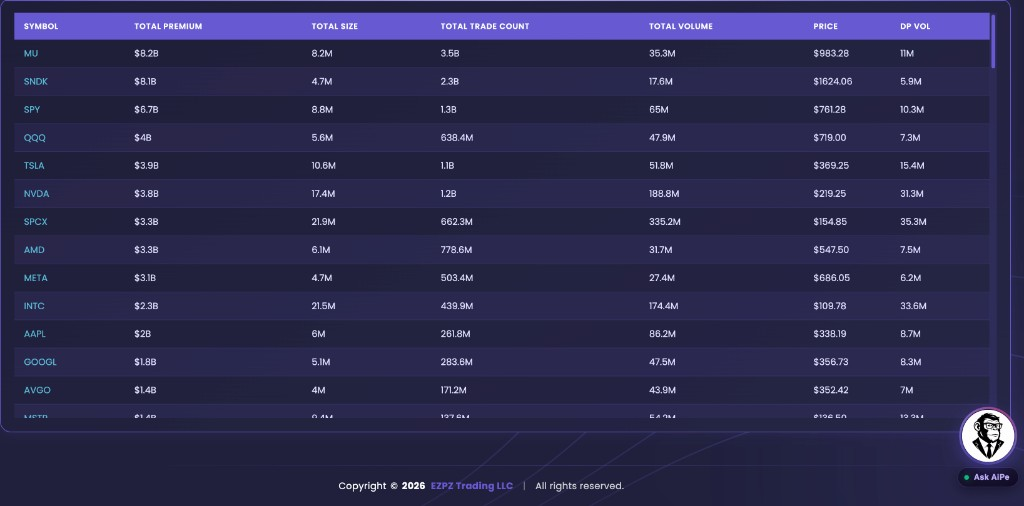
Largest dark pool by ticker is a session leaderboard of off-exchange equity activity. Each row is one symbol with a running Total Premium, Total Size, Total Trade Count, Total Volume, Price, and DP Vol. It is a rank of where dark size concentrated, not a tape of individual prints and not a buy list.
Dark pool prints still hit the public tape after the fill. This page does not show those prints one by one. It adds the session up by symbol so you can see which names carried the most off-exchange notional. Total Premium is the fastest sort. DP Vol is the dark share size on that same row. Total Volume is the broader volume on the name. A mega-cap can sit at the top simply because it always trades huge size. A quieter name with a large DP Vol versus Total Volume can be the more unusual row even if Total Premium is smaller. The scatter plots those same names with Premium on the Y axis. Dot size is DP Volume Ratio, dark pool volume as a share of Total Volume. Green leans bullish. Red leans bearish. That color is a lean, not proof of accumulation. Hover a dot for Premium and DP Volume Ratio. Use Orders to keep 5, 20, 30, or All names on the chart. The table still holds the full rank.
On EZPZ, the live chrome titles the page Largest Dark Pool By Ticker. The table starts sorted by Total Premium, high to low. There is no ticker search on this page. Dark Pool Flow is the all-ticker off-exchange tape. SPY Flow locks that tape to SPY. $1M+ Premium Dark Pool Flow keeps only million-dollar prints. $1M+ DP Volume Flow is the high dark-volume tape. Largest Single Dark Pool Trades ranks one print at a time. Dark Pool Sectors rolls the same session into industry-group bars. Dark Pool Top Levels groups one ticker's prints by price. Daily Dark Pool Amount plots one ticker's Amount (M) against Price by Date. Dark Pool Movers and Shakers is SPY Price versus running Buy Amount and Sell Amount. Dark Pool Net Flow is one ticker's Buy Amount versus Sell Amount plus Volume bars. Dark Pool Sentiment is Cumulative Net Amount (M) bars by Date. Block Trades Sentiment is Buy Premium (M) versus Sell Premium (M) by Date, plus Volume Sentiment. Dark Pool Index (DIX) is a market-wide gauge, not a ticker list. Dark Pool Indicator (DPI) is pressure versus the 20-day average, not a ticker rank. Bullish Dark Pool Net Premium ranks names by Net Premium. Bearish Dark Pool Net Premium ranks the same Net Premium figure from the most negative reading. DarkVol Leaders ranks names by DarkVol Ratio %. Live Flow is listed options prints.
How Largest Dark Pool By Ticker works on EZPZ
Each row is one ticker's session total. It is not a score. Most people start with Symbol and Total Premium, then read DP Vol against Total Volume. If a name looks large only because it is always busy, click another header. Use the scatter when you want Premium and DP Volume Ratio in one picture. Change Orders if the chart is crowded. Then open a tape page if you want the prints behind the total.
How this differs from Dark Pool Flow and single prints
Dark Pool Flow is the live tape. This page is the market-wide total by ticker. Use the tape when you want TIME, PREMIUM, DARK RATIO, and DIRECTION on each print. Use this page when you do not already have a name and you want the rank. Largest Single Dark Pool Trades keeps the biggest individual prints. Dark Pool Sectors is Highest Premium Inflow and Highest Volume Inflow, then Premium vs Volume bars, not a ticker rank. Dark Pool Top Levels stays on one ticker and stacks that name's prints by price. Daily Dark Pool Amount is Amount (M) versus Price by Date on one ticker, not a market rank. Dark Pool Movers and Shakers is SPY Price versus running Buy Amount and Sell Amount. Dark Pool Net Flow is one ticker's Buy Amount versus Sell Amount plus Volume bars. A name can top this board with many smaller prints and never appear on that list. $1M+ Premium Dark Pool Flow and $1M+ DP Volume Flow still show tape rows with a size floor. SPY Flow is only SPY. Dark Pool Index (DIX) rolls the market into one number. Live Flow is options, not equity dark pool totals.
Anatomy of a ticker row
Read a row left to right: the symbol, then how large the session was. You do not need every column on every name. Click a header to change the sort. Total Premium is the starting rank.
These columns answer which name you are looking at, and at what price.
| Column | What you are looking at |
|---|---|
| Symbol | The ticker. There is no search box on this page. Scan or sort the list instead. |
| Price | The price shown on the row. Use it to judge whether Total Premium came from expensive shares or from lots of cheaper ones. |
These columns help you decide if the name is large enough to spend time on.
| Column | What you are looking at |
|---|---|
| Total Premium | Session off-exchange notional for that ticker. This is the default sort, high to low. |
| Total Size | Share size added up for the session. |
| Total Trade Count | How many dark pool trades went into the total. A huge premium with a small count is chunkier than the same premium across many prints. |
| Total Volume | The broader volume on the name, used next to DP Vol. |
| DP Vol | Dark pool volume on the row. Compare it to Total Volume. That share is the DP Volume Ratio on the scatter. |
Premium and DP Volume Ratio scatter
The chart card is labeled Premium & DP Volume Ratio, Scatter by Symbol. It uses the same session totals as the table. It does not add a second dataset.

- Orders: How many names the scatter keeps. Choices are 5, 10, 15, 20, 30, and All. The page starts at 20.
- Premium: The left axis. Higher dots have more Total Premium.
- Dot size: DP Volume Ratio. A larger dot means more of that name's Total Volume printed as DP Vol.
- Dot color: Green is a bullish lean. Red is a bearish lean. It is a tag, not a thesis.
How people actually use it
Scan the rank first
Leave Total Premium as the sort. Note which names you already expect at the top. Then look for a name that does not belong in that company.
Check DP Vol versus Total Volume
A high Total Premium with a small DP Vol share can be routine. A smaller premium with a large DP Vol share is often the row worth a second look.
Use Orders on the scatter
Drop to 10 or 15 when you only want the premium leaders. Switch to 30 or All when you want more of the list on one chart.
Open the tape next
This page is a rank, not a setup. Open Dark Pool Flow for prints, or Largest Single Dark Pool Trades if you care about one huge fill.