Learn Center
$1M+ DP Volume Flow
Off-exchange prints where dark pool volume already clears one million dollars, even when snapshot premium is smaller.
What is $1M plus DP volume flow?
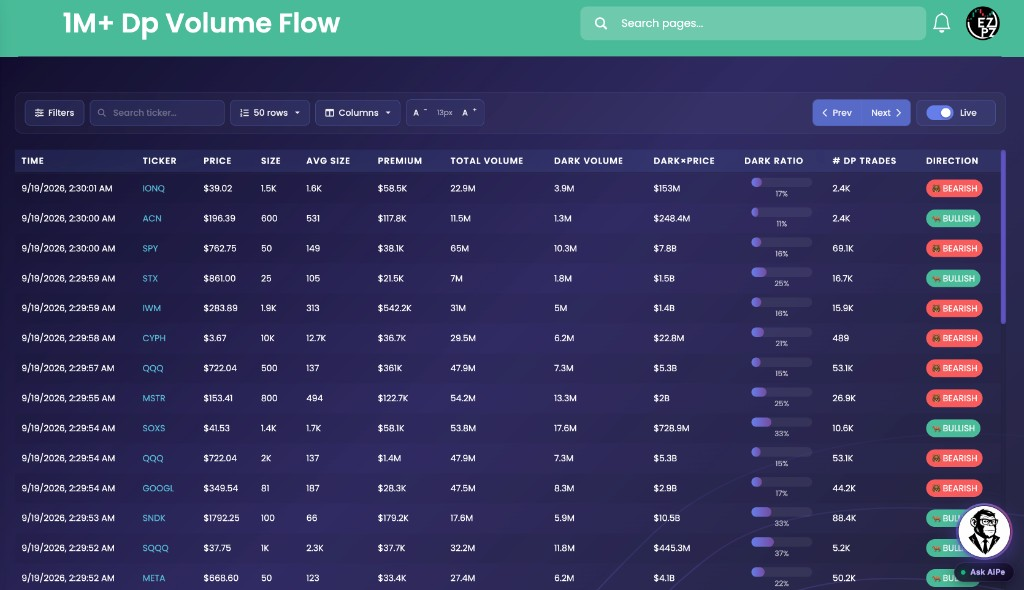
$1M plus DP volume flow is the live tape of off-exchange equity prints where dark pool volume already clears one million dollars. Dark Volume is shares reported off exchange. Dark times price is that size in dollars. PREMIUM on the same row can still be smaller. This view keeps the high dark-volume rows.
Reading a row is the same job as any dark pool tape. Dark Volume and Dark times price tell you whether enough off-exchange size moved to care. PREMIUM is the snapshot notional and can sit well under a million while Dark Volume is huge. Dark Ratio shows how much of that ticker's tape printed off exchange. Direction is a row label, not proof someone is accumulating. The print hits the tape later. It is not a hidden buyer.
A million-dollar dark volume print can come from cheaper shares or from fewer expensive ones. Repeated high-volume rows on the same ticker are a stronger prompt than one snapshot. Size still does not tell you who traded, or whether it was a block, a market-maker fill, or one slice of a larger parent order.
On EZPZ, $1M+ DP Volume Flow is that tape with the dark-volume floor already locked. The live chrome titles the page 1M+ Dp Volume Flow. You can search a ticker, change direction, and raise Premium, Price, Total Volume, Size, or # of DP Trades. You cannot lower the million-dollar dark volume cut. Dark Pool Flow is the all-ticker tape with no size floor. SPY Flow locks the same columns to SPY. $1M+ Premium Dark Pool Flow keeps only prints whose PREMIUM already clears one million dollars. $1M Plus Flow is listed options prints with a million-dollar premium floor, not equity dark pool prints.
How $1M+ DP Volume Flow works on EZPZ
Each row is one reported snapshot that already cleared one million dollars of dark volume: the ticker, the size, the premium, and how much of that name's volume printed in the dark. It is not a score. Most people start with TICKER, DARK VOLUME, DARK×PRICE, and DARK RATIO. If a row looks interesting, read PREMIUM, AVG SIZE, # DP TRADES, and DIRECTION next. When even this list is too much, filter to a ticker you already care about or raise the Premium floor.
How this differs from $1M+ Premium Dark Pool Flow
$1M+ Premium Dark Pool Flow is the same off-exchange tape with a million-dollar PREMIUM floor. Its Filters drawer has no Premium range. This page is the dark-volume floor. PREMIUM can still be $58K while DARK VOLUME is millions of shares. Use the premium page when you only want million-dollar notional. Use this page when you want names whose dark volume already cleared one million dollars, even if the snapshot premium is smaller. Use Dark Pool Flow when you want the quieter prints around a standout. Use SPY Flow when you only care about the S&P 500 ETF. Use $1M Plus Flow when you want listed options fills, not equity dark pool prints.
Anatomy of a print
Read a row left to right: when it printed, what ticker, then how large the dark activity is. You do not need every column on every print. Use the tabs if you want a map of the fields.
These columns answer what printed, and when.
| Column | What you are looking at |
|---|---|
| TIME | When the print was reported. Dark pool prints can arrive after the fill. |
| TICKER | The symbol. Search ticker lives in the toolbar and in the Filters drawer. |
| PRICE | The reported trade price. |
| DIRECTION | Bullish, bearish, or neutral label on the row. It is a tag, not a thesis. |
These columns help you see how the dark-volume print was built, and how large the snapshot notional is.
| Column | What you are looking at |
|---|---|
| SIZE | Share size on this snapshot. A small size with huge dark volume is usually an expensive name. |
| AVG SIZE | Average shares per dark pool trade in the row. Larger usually means fewer, chunkier prints. |
| PREMIUM | Dollar notional on this snapshot. It can be well under $1M on this page. Raise the Premium min if you want both floors. |
| # DP TRADES | How many individual dark pool transactions are rolled into this row. |
These columns compare off-exchange size to the ticker's total volume. This is the job of the page.
| Column | What you are looking at |
|---|---|
| TOTAL VOLUME | Shares traded across venues, lit plus dark. |
| DARK VOLUME | Shares reported off exchange for this ticker. Every row here is already a large dark-volume print. |
| DARK×PRICE | Dark volume times price. The dollar read on the same size. |
| DARK RATIO | A bar and percent of dark volume over total volume. A fuller bar means more of that name's tape printed off exchange. |
Filter the tape
Click Filters in the toolbar. That drawer is how you cut a high dark-volume tape down to a watchlist name, a direction hunt, or a premium screen. Reset puts the defaults back. All three direction toggles start on. There is no Dark Pool Volume range in this drawer. The million-dollar dark volume floor is the page.

Toggles
- Direction: Bullish, bearish, and neutral row labels. Turn two off if you only want one color.
Ranges
- Search ticker: Limit the tape to one symbol. The same search also lives in the toolbar.
- Price, Premium, Total Volume, Size, # of DP Trades: Min and max. Leave a field empty and there is no cap on that side (shown as infinity).
On the toolbar you can also change how many rows you see (50 is the starting setting), which columns are visible, and the text size. Those controls do not live in the Filters drawer.
Stay live
The right side of the toolbar controls whether the tape keeps moving:
- Live: newer matching prints can show up during market hours.
- Paused: the tape freezes so a row does not scroll away while you read it.
- Prev / Next: page toward newer or older prints that still match your filters.
How people actually use it
Watch the biggest dark volume
Leave ticker search empty. Keep Live on. You are listening for dark volume across the whole market, not one name.
Add a premium floor yourself
Raise Premium in Filters when you want both high dark volume and large snapshot notional. The dark-volume floor stays put.
Do not confuse it with premium flow
This page keeps high dark-volume rows. Open $1M+ Premium Dark Pool Flow if you only want prints whose PREMIUM already cleared $1M.
Use it next to the full tape
This page is the dark-volume slice. Open Dark Pool Flow if a row makes you want the quieter prints around it. Open $1M Plus Flow if you want options around the same name.