Learn Center
AiPe Assistant
AiPe is the AI analyst built into EZPZ chart and data pages. Click Ask AiPe in the bottom right corner and ask about the exact data on your screen.
An AI analyst built into the page you are on
AiPe sits in the bottom right corner of EZPZ's chart and data pages. Click it, ask about what you see, and it reads the live numbers on your screen, explains them in plain words, and can change the page for you.
What is AiPe on EZPZ?
AiPe is the AI analyst built into EZPZ's chart and data pages. Click the Ask AiPe button in the bottom right corner, ask a question, and AiPe reads the data loaded on your screen and answers about it. Each page has its own specialist, and on many pages AiPe can also switch the ticker, filter, or mark the chart.
Most questions traders have are about the page in front of them. What does this reading mean? Is this flow bullish? Which of these names matters? AiPe answers those without you leaving the page, copying numbers, or describing the chart. Every time you send a message it takes a fresh snapshot of the page, including the ticker, the date range, the cards, the chart, and the table, so its answer quotes the same values you can see. Each page gets a specialist that knows that page's metrics: on the Dark Pool Index it is the DIX Analyst, on the regime leaderboard it is the Market Regime Analyst, and on Market Price Action Trend it is the Price Action Trend Analyst. AiPe also doubles as a page guide, so "how do I read this page?" works everywhere. For research that spans many tools at once, AiPe's brother EZRA goes deeper.
How AiPe works, step by step
- Open a supported pageSign in on Pro, Premium, or Elite and open any EZPZ chart or data page with AiPe, such as Live Flow, Intraday Regime Leaderboard, or Dark Pool Index.
- Click Ask AiPeThe round AiPe button with the Ask AiPe label floats in the bottom right corner. Clicking it opens the AiPe panel beside the page.
- Ask, or tap a chipType in the box or tap one of the quick question chips above it. The chips are written for that page, so they are a good first question.
- AiPe reads the pageIt takes a snapshot of the data on your screen, shows Analyzing while it reads, then streams its answer.
- Follow up or let it actAsk a follow up in the same panel, or ask it to change the page. When it switches the ticker, a divider such as Switched to NVDA marks the point in the chat.
See AiPe in action
These three captures show AiPe on three different EZPZ pages, each with its own specialist, chips, and message box hint.
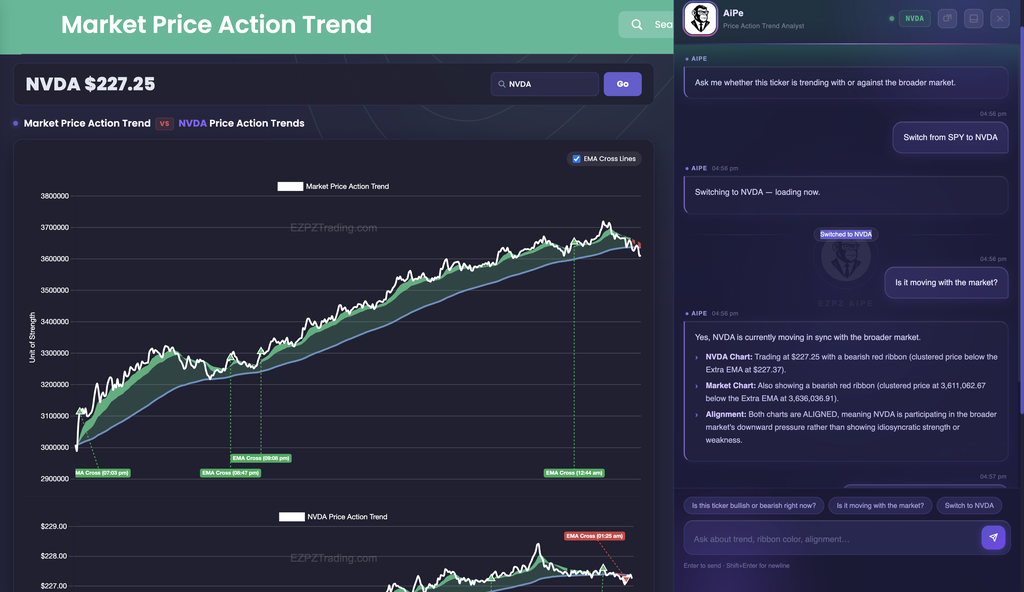
In this capture
- The panel greets you with "Ask me whether this ticker is trending with or against the broader market." The NVDA pill in the header is the ticker AiPe is reading.
- The member typed "Switch from SPY to NVDA". AiPe replied that it was switching, the page reloaded on NVDA ($227.25 in the header), and a Switched to NVDA divider appeared in the chat.
- The follow up "Is it moving with the market?" got a three point answer covering the NVDA chart, the market chart, and whether they are aligned. Here both leaned bearish, so AiPe read NVDA as moving with the market rather than on its own.
- Chips on this page: Is this ticker bullish or bearish right now?, Is it moving with the market?, and Switch to NVDA. The box hint reads Ask about trend, ribbon color, alignment.
Read the page itself in Market Price Action Trend.

In this capture
- The greeting offers overall market breadth, top bullish and bearish names, and conviction signals.
- "Which symbols have the strongest conviction?" returned the names marked High in the Conviction column with their scores, for example MSFT (Bullish, +78.7) and SPCX (Bearish, -43.3). Both match their rows in the table on the left.
- The member then asked "Explain the scoring system". AiPe explains what the scores and labels mean, but EZPZ's scoring method itself is proprietary, and AiPe says so.
- Chips on this page: What is the overall market bias right now?, Which symbols have the strongest conviction?, Explain the scoring system, and What does the ⚠ divergence flag mean?
Read the page itself in Intraday Regime Leaderboard.

In this capture
- "Is DIX trending up or down?" got the 7 day average of 49.6% against the 30 day average of 50.1%, a trend of -0.5% (falling), plus a note that the latest session bounced.
- "What is the current DIX reading?" got 51.3586% from 2026-09-21, above the 45% neutral reference line. Every number matches the LATEST DIX, 7-DAY AVG, 30-DAY AVG, and TREND (7D) cards on the page.
- The chip Show the last 60 days changes the chart's date range for you, and the box hint reads Ask about the DIX trend, or change the date range.
Read the page itself in Dark Pool Index.
What AiPe can do
Read the live page
Give me a full analysis of what you see right now. AiPe works from the cards, chart, and table on your screen when you send.
Call the bias
Is the flow bullish or bearish right now? AiPe gives a read and the numbers behind it.
Find the key levels
What are the key levels I should watch? It picks out the strikes, prices, or rows that stand out.
Spot what is unusual
Is this unusual activity or normal? What happened at that spike? It compares a print or a move with the rest of the page.
Switch ticker or range
Switch to NVDA. Show the last 60 days. On pages with a ticker search or range buttons, AiPe changes them for you.
Apply filters
Show sweeps and blocks only. Show $500K+ premium trades. Reset all filters back to default. On flow and scanner pages AiPe sets the filters without you clicking.
Mark the chart
Highlight the biggest spike. Mark the bullish crossover moments. On chart pages AiPe can mark times, ranges, strikes, or table rows, and clear them again.
Teach the page
How do I use this page? What is gamma exposure and why does it matter? Every specialist is also a guide to its own page.
Hand off to EZRA
When a question needs data from across EZPZ, AiPe points you to EZRA or to the right EZPZ page.
What a page can change depends on its controls. A flow page has filters to set, a chart page has moments to mark, and a single ticker page has a ticker to switch. If AiPe cannot act on something, it still explains it.
The AiPe panel
| Part | What it does |
|---|---|
| Ask AiPe button | The round AiPe avatar in the bottom right corner of a supported page. Click it to open or close the panel. |
| Header | AiPe, with the page specialist underneath (for example DIX Analyst), a green dot while connected, and a ticker pill such as NVDA on ticker pages. |
| Open in new tab | Moves the live panel into its own browser tab, which is handy on a second monitor. Click Dock back to page to return it. Allow pop ups for EZPZ if nothing opens. |
| Dock to Bottom / Dock to Right | Switches the panel between a drawer on the right and a full width dock at the bottom. Drag its edge to resize. EZPZ remembers your choice. |
| ✕ | Closes the panel. |
| Chat | Your questions on the right, AiPe's answers on the left with a timestamp. Bullish, bearish, and neutral words are color coded, and dividers mark ticker switches. |
| Chips | Quick questions written for that page, just above the message box. Tap one to send it straight away. |
| Message box | Type your question. Enter sends, Shift+Enter adds a new line. Keep each message under 600 characters. |
| Page buttons | Some pages add ✕ Clear highlights or ↺ Reset filters under the chat to undo what AiPe changed. |
Who can use AiPe
| What you get | Visitors and Free | Pro, Premium and Elite |
|---|---|---|
| Ask AiPe button | No, the button is hidden | Yes, on every supported page you can open |
| Questions | None | No daily quota, up to 600 characters per message |
| Page actions | None | Ticker, range, filters, and highlights where the page supports them |
| Memory | None | The current conversation while the page stays open |
Tips for better AiPe answers
- Set the page first. Pick the ticker, range, or filters you care about, or ask AiPe to set them, then ask. It reads what is on screen when you send.
- Ask again after a change. If you change the ticker or timeframe yourself, send a new question so AiPe takes a fresh snapshot.
- Start with a chip. The chips are the questions each specialist answers best.
- Keep follow ups in one sitting. AiPe remembers the conversation until you reload or leave the page. Chats are not saved, so copy anything you want to keep.
- Match the numbers. AiPe quotes the values it used, so check them against the cards and rows on the page.
What AiPe will not do
- It will not explain how EZPZ builds a score, signal, or indicator. It says the method is proprietary and helps you read the result instead.
- It will not tell you to buy or sell. It explains the data; the decision is yours.
- It stays on the page's topic. For wider research it points you to EZRA.
- It answers in English.
How AiPe differs from EZRA and the AI TradingView Connector
AiPe is tied to one page and reads that page's data, so it is the fastest way to understand what you are looking at. EZRA is EZPZ's standalone research analyst for Elite members: it pulls options flow, dark pool, gamma, regime, and fundamentals data from across EZPZ into one answer with its own charts and tables, and keeps a chat history. The AI TradingView Connector is the EZPZ Finn desktop app that brings EZPZ data and AI next to your TradingView charts. Use AiPe for "what am I looking at?", EZRA for "what should I be looking at?", and the connector when you work in TradingView.